How To Download/Export Facebook Lead Ads and Manually Ad Them To Campaigns & Workflows
In Business Suite, you can export a file that contains the information that people submit through your Instant Form. You can also download this data from Ads Manager, request it through the API or access it through an integrated CRM system. We recommend that you download your leads data directly from Business Suite if you don’t have a CRM system integrated with Facebook.
To download leads data from Business Suite:
- Go to Business Suite.
- Click More Tools from the menu.
- Click Instant Forms.
- Click Download next to the form with the leads you want to export.
- Choose how you want to download your leads:
- Click Download New Leads if you only want to export the leads that you’ve received since the last time you downloaded.
- Click Download by Date Range if you want to download all the leads you’ve received during a certain time period. After you select this option, choose the preferred date range and click Download.
- A window appears with your form information. Click CSV to download the leads data in your preferred file type.
Note: You have 90 days from the time a lead submits their form to download their information. Leads expire after 90 days. We recommend that you export your leads data regularly.
When you download your file, if you don't see an Ad ID or Ad Set ID field, it may be because:
- The lead was generated via organic reach.
- The lead was submitted via an ad preview.
- You don’t have advertiser privileges on the ad account that created the lead ad campaign.
To troubleshoot your file download:
If you can’t download your leads file:
- Check with your Business Manager admin to see if they’ve customized access permissions in Leads Access Manager.
- If they haven’t customized permissions, reach out to your Facebook Page admin to give you the correct access. Before customization, only Facebook Page admins can download leads.
- If they’ve customized permissions, make sure they’ve given you the correct access. After customization, only people assigned access permission can download leads.
To Import The Leads Into the CRM:
(New UI)
- Navigate to Contacts and click the Import Contacts Bulk Action
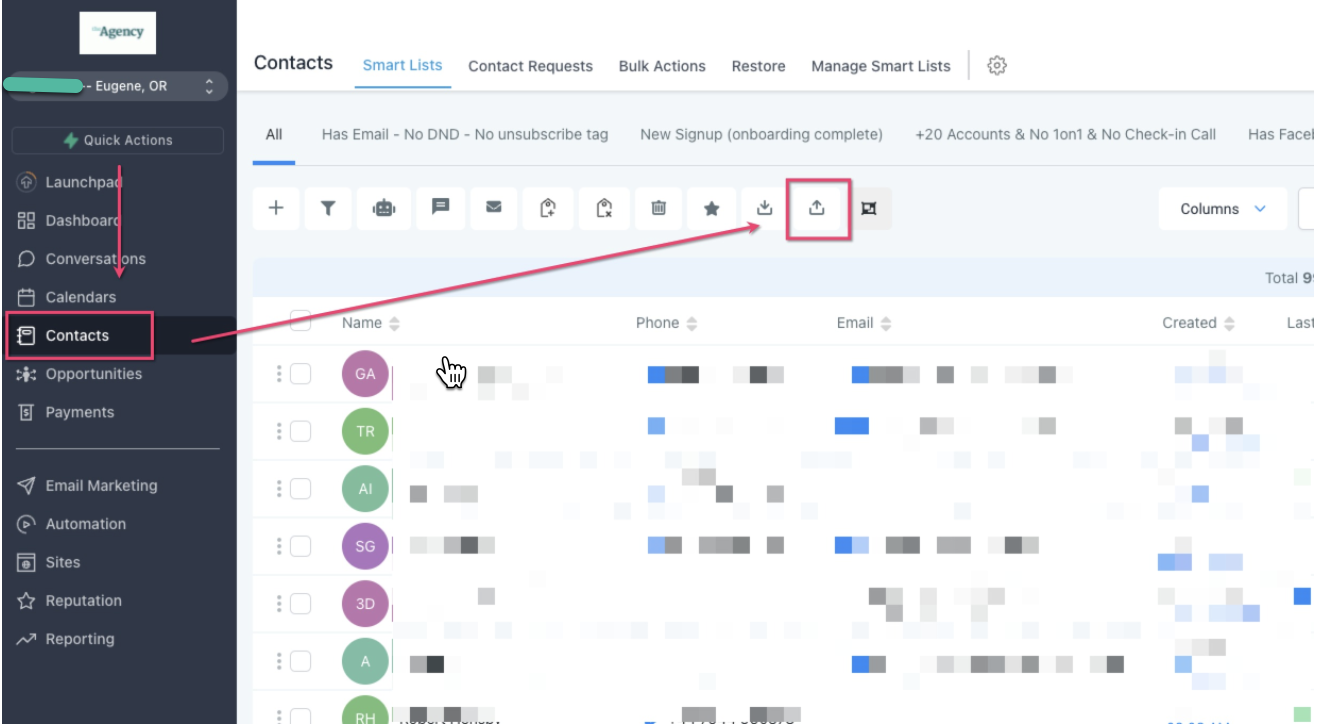
- Select your CSV file and click Next
- Map the fields from your Facebook Lead Form to your CRM fields and click the Next button
- On the Details tab, click the Advanced dropdown, add a tag for these leads (optional), and toggle on "Add To Workflow/Campaign" and select the Workflow or Campaign that you'd like to add the leads from the CSV to
(Old UI)
- Navigate to Contacts and click the Import Contacts Bulk Action
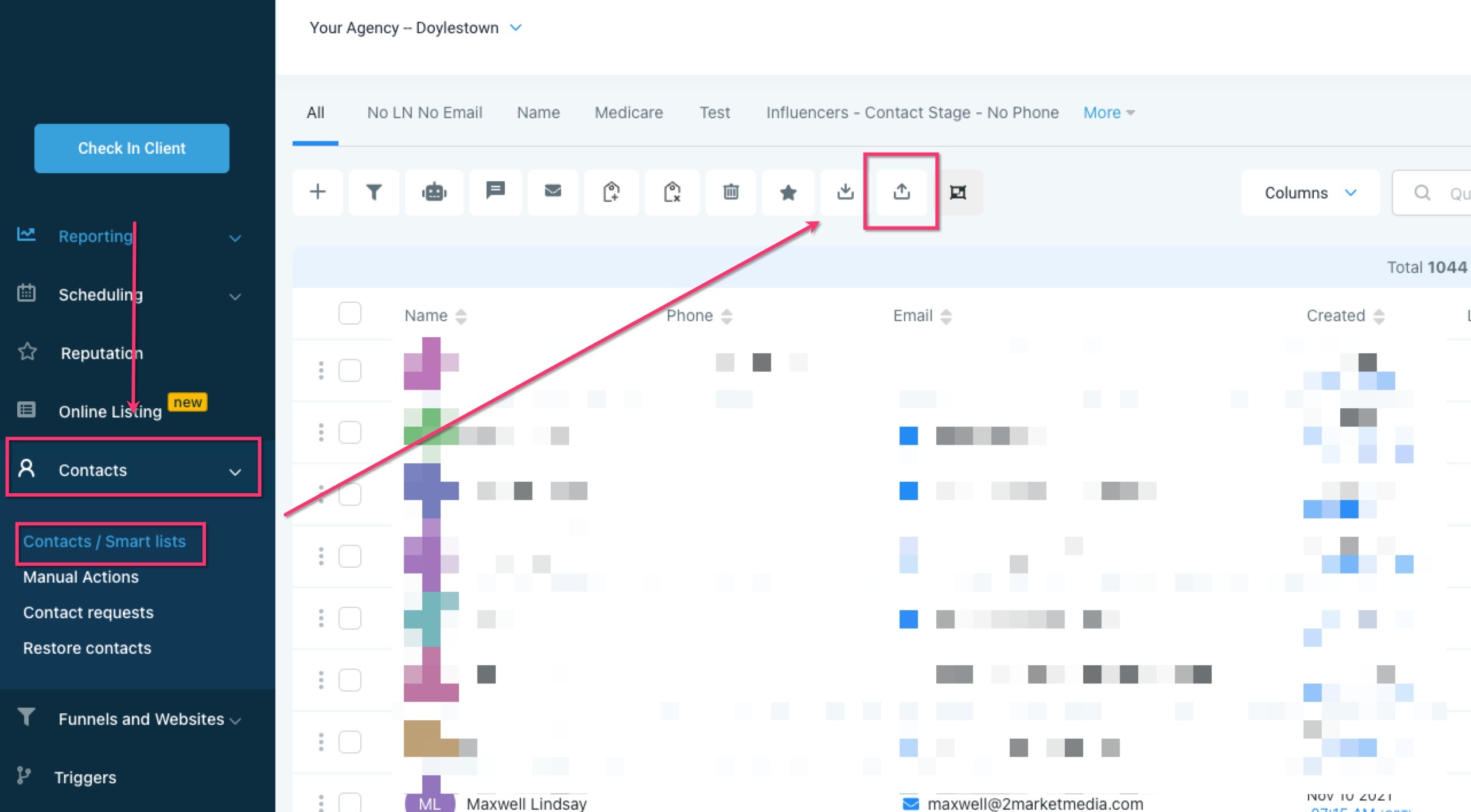
- Select your CSV file and click Next
- Map the fields from your Facebook Lead Form to your CRM fields and click the Next button
- Review the sample data and click Continue
- Select your Duplication Strategy
- Select or create a tag to be applied to everyone in the CSV
- In filters, type tag, then select the tag you created in the previous step
- Select all the contacts
- Click the "Add To Campaign/Workflow" Bulk Action
- Click Proceed then select the Campaign/Workflow from the dropdown, give the action a name, then click the "Add to Campaign/Workflow" button
Was this article helpful?
Related articles
- Facebook Pages missing in Page Selector Dropdown during integration.The issue with Facebook Business Page(s) not showing up when you integrate FB with your CRM account is relatively common, and this article aims to help you troubleshoot that. How to fix the issue with FB pages not showing up in the Page Selector dropdown? You will start by going to your Facebook aFacebook
- Facebook Lead Ad Integration & Troubleshooting GuideThe Facebook Lead Ads integration allows you to collect leads directly from Facebook Ads and have them automatically synced with your CRM. With this integration, you can easily capture contact information from potential customers interested in your products or services on Facebook and quickly followFacebook
- Facebook Conversion Leads WalkthroughFacebook Conversions API aims to connect your marketing data directly with Funnels and Workflows in ResQEngage and Facebook Meta that help optimize ad targeting, decrease cost per result, and measure outcomes. With Facebook Conversion API, you can collect the people who are more likely relevant audiFacebook
- How to set up a Funnel Event Pixel for Facebook Conversion API?Facebook Conversions API (or CAPI) is designed to help businesses deliver personalized advertising experiences to customers and audiences, all while maintaining data privacy. This tool lets you send web events directly to Facebook from their respective servers. If you use a Facebook Pixel to track eFacebook