Instructor Ranks, Streaks, and Badges
Pulse measures organizations, but it also measures the individual instructors who do the teaching. This article covers the three personal measures — rank, streak and badges — and how each one is earned.
Before You Begin
- These features appear on the Pulse > Overview tab and require Pulse to be enabled.
- Ranks, streaks and badges are all awarded automatically from teaching activity. None of them can be granted by hand.
- Every instructor sees their own rank card. Organization-level figures are shared across the account.
Instructor Rank
Every instructor in your organization has a personal Pulse rank, shown in the My Instructor Rank card on the Overview tab. The card displays the instructor's name, current rank title, lifetime Beats and the Pulse / CPR Enroll wordmark. New instructors begin at Trainee and progress as they teach.

Share Card
Click Share card to generate an image of the rank card that instructors can post or send. This is a common request from instructors building a personal brand.
Teaching Streaks
Below the rank card is a week-streak counter. A streak counts consecutive weeks in which the instructor taught at least one class. Streaks reset when a week passes with no teaching activity.
✔ A streak measures weeks, not classes. Teaching five classes in one week and none the next still breaks the streak. Teaching one class every week keeps it running.
Badges
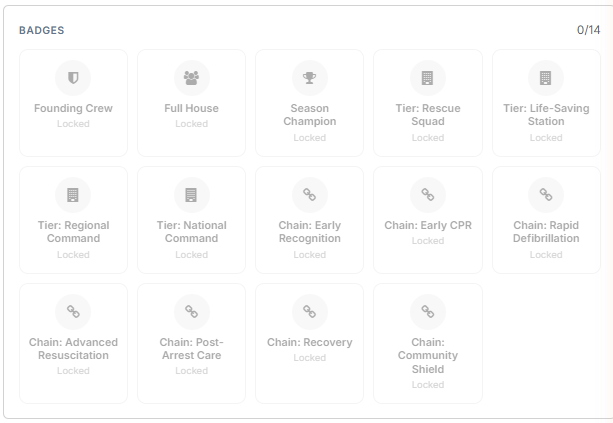
The Badges panel on the Overview tab shows the full badge set with a progress count — for example, 0/14. Locked badges are greyed out. The badge set falls into three groups:
| Group | Badges | How they unlock |
|---|---|---|
| Achievement | Founding Crew, Full House, Season Champion | Awarded for specific milestones in your account's activity. |
| Tier | Rescue Squad, Life-Saving Station, Regional Command, National Command | Unlock automatically when your organization reaches the matching tier. |
| Chain of Survival | Early Recognition, Early CPR, Rapid Defibrillation, Advanced Resuscitation, Post-Arrest Care, Recovery, Community Shield | Unlock at Lives Ready milestones. See the Challenges article. |
Best Practices
- Point new instructors at their rank card early — starting at Trainee with zero Beats is expected, and watching the card move is what makes it motivating.
- Use Share card images in recognition emails and social posts rather than screenshotting the dashboard.
- Treat a broken streak as a scheduling signal: it often means an instructor has quietly dropped off the teaching rota.
- Do not promise a badge to an instructor. Badges are automatic and cannot be granted manually.
Frequently Asked Questions
| Question | Answer |
|---|---|
| Can I award a badge manually? | No. Badges are awarded automatically and there is no manual override. |
| What rank do new instructors start at? | Trainee, with zero lifetime Beats. |
| What breaks a teaching streak? | A full week with no classes taught. The streak resets to zero. |
| Do tier badges depend on my personal performance? | No. Tier badges unlock when the organization reaches a tier, so everyone in the organization gets them at the same time. |
| Where do Chain of Survival badges come from? | Lives Ready milestones. They are covered in the Challenges and Rewards article. |
✔ That covers the personal measures. Next, read Pulse Leaderboards and Anonymous Handles for how instructors and organizations compare with others.
Was this article helpful?
Related articles
- What Is Pulse and How Do I Turn It On?Pulse is an engagement layer that sits on top of the class, enrollment and certification data you are already producing. It gives your organization, your instructors and your students a running picture of the impact your training has, and it celebrates milestones along the way. There is nothing to cGetting Started
- Lives Ready, Beats, and Organization Tiers ExplainedPulse uses three numbers. This article explains what each one measures and how it moves. Before You Begin - Pulse must be enabled. If you do not see the Overview panels, check Pulse Settings > Enable Pulse. - Every figure on this page is calculated from records already in your account. Nothing here Getting Started
- Pulse Leaderboards and Anonymous HandlesLeaderboards let your organization compare its Pulse activity with other CPR Enroll organizations. Participation is optional and off by default. Before You Begin - Pulse must be enabled before leaderboards are available. - Decide whether you want to appear under your real organization name or an anoGetting Started
- Challenges, Chain of Survival Milestones, and RewardsThe Challenges and Rewards tabs in Pulse turn activity into concrete goals. Challenges are set by CPR Enroll and complete automatically; rewards are yours to define. Before You Begin - Pulse must be enabled to see either tab. - Challenges complete automatically from recorded activity. There is nothiGetting Started