Opportunity Owners Decoupling Settings
With this new feature, you can now have separate owners for contacts and opportunities in your system. This flexibility allows for more nuanced management and delegation of responsibilities within your organization.
TABLE OF CONTENTS
Enabling the Feature
To enable this feature, follow these steps:
- Navigate to Settings.
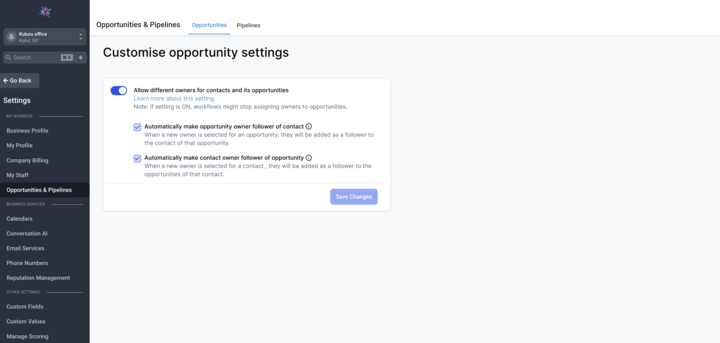
- Find the "Allow different owners for contacts and its opportunities" option.
- Toggle the setting to "On."
Functionality
Both contacts and opportunities can have different owners once the toggle has been turned on.
Default Opportunity Owner: When creating a new opportunity, the default owner will be the same as the contact owner. However, this can be updated as needed to reflect the appropriate ownership.
Workflow Action (Coming Soon): Stay tuned for an upcoming workflow action that will enable further customization and automation with this feature.
Subsettings: There are two additional subsettings available -
- Allow updating the contact follower based on the opportunity owner change: Enable this setting to automatically update the contact follower when the opportunity owner is changed.
- Allow updating the opportunity follower based on the contact owner change: Enable this setting to automatically update the opportunity follower when the contact owner is changed.
How It Helps
- Improved Customization: Tailor ownership settings to match your organization's specific structure and workflows.
- Efficient Communication: Automatically update followers based on ownership changes, ensuring seamless communication and collaboration.
With the ability to decouple owners for contacts and opportunities, you have greater control and flexibility in managing your CRM.
Was this article helpful?
Related articles
- Import OpportunitiesTABLE OF CONTENTS - Prepare Your Data- Supported File Types - File Preparation Requirements - Mandatory Fields - Understanding Import Options - Structuring Your File - Importing Your File - Troubleshooting Common Errors - Additional Tips Importing files into our system is straightforward if you folOpportunities
- Understanding PipelinesPipelines are an essential feature that streamline and automate various processes within your business workflows. They enable you to create structured sequences of actions that guide leads or customers through predefined steps, ensuring efficient communication and consistent engagement. Pipelines cOpportunities
- How to Color-Code Opportunity Pipelines (Smart Tags)Smart Tags help you visually prioritize opportunities inside your pipelines using color-coded chips. Instead of relying on filters or text labels, you can highlight deals automatically based on rules you define — such as stale deals, high-value opportunities, or new leads.This article shows you how Opportunities
- Understanding Pipelines & OpportunitiesAn opportunity is a potential deal or booking tied to a contact. A pipeline is the set of stages an opportunity moves through from start to finish. Together they give you a visual board of where every lead stands. Why pipelines matter - Visibility: see where every opportunity stands at a glance. - COpportunities