Stripe Payment Integration for Secure Online Transactions
Accepting payments online should be simple, secure, and reliable. Connecting a payment provider allows you to process transactions, manage subscriptions, and streamline customer payments without friction.
This guide walks through how to connect Stripe so you can start accepting payments quickly and efficiently.
What is Stripe Integration?
Stripe integration enables you to securely accept credit card payments, manage subscriptions, and handle transactions directly within your system. By connecting your Stripe account, you create a seamless payment experience for your customers while maintaining full control over billing and reporting.
This connection ensures that all transactions are processed securely and that payment data flows correctly into your system for tracking and management.
Key Benefits of Stripe Integration
Connecting Stripe provides several advantages that improve both customer experience and operational efficiency:
Secure Payments: Process transactions safely with trusted payment infrastructure
Faster Checkout: Reduce friction with streamlined payment flows
Subscription Management: Easily handle recurring billing and plans
Centralized Tracking: Keep all payment activity in one place
Scalable Setup: Support growth with flexible payment capabilities
How To Connect Stripe
Proper setup ensures payments are processed without issues. Follow the steps below to connect your Stripe account.
Step 1: Navigate to Payment Integrations
Open your Payments section and access the integrations area where payment providers are managed.
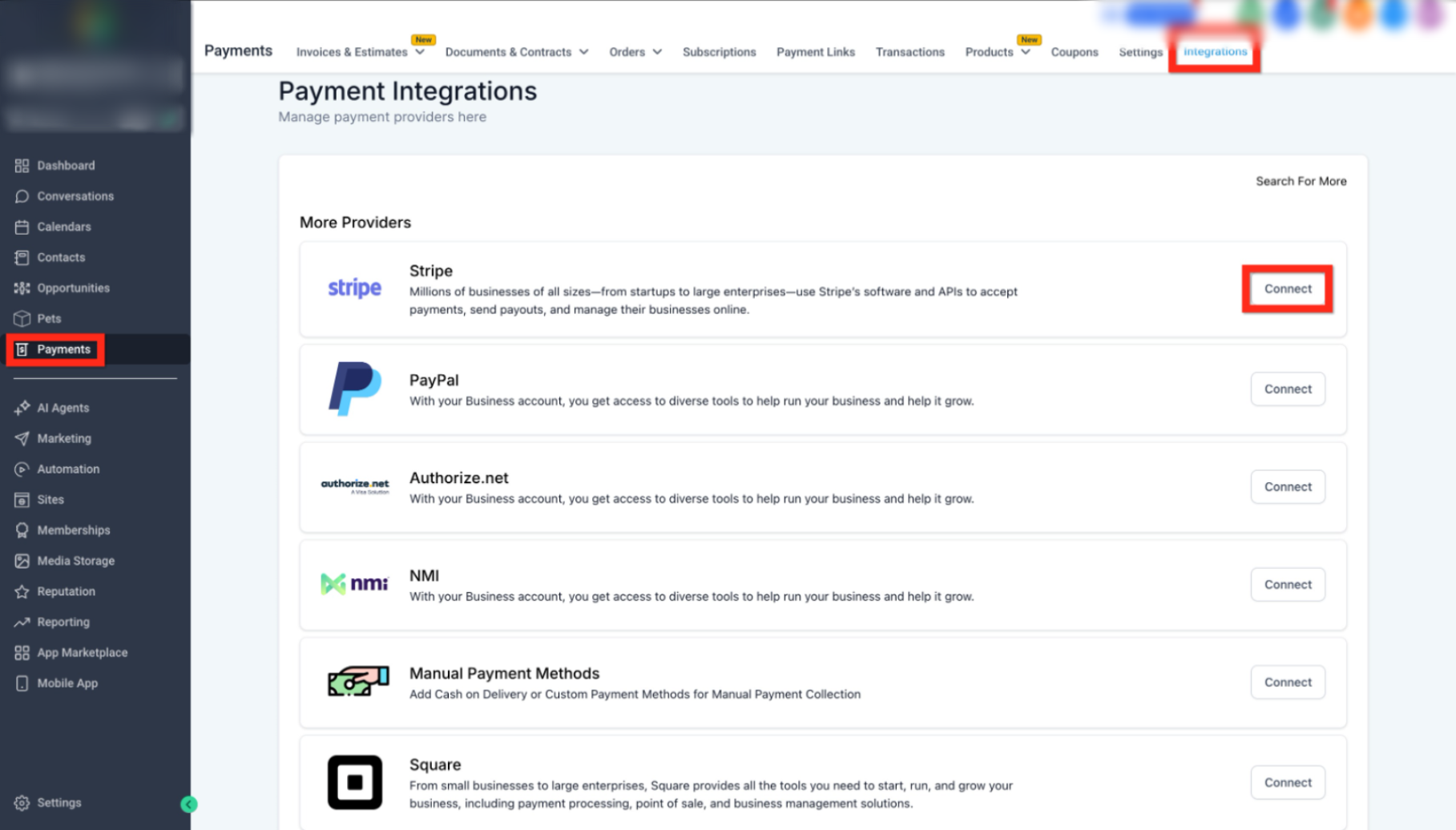
This image shows where to locate the Payments section and open the Integrations tab.
Click Payments in the left navigation
Select Integrations from the top menu
Step 2: Select Stripe and Start Connection
Locate Stripe in the list of available providers and begin the connection process.
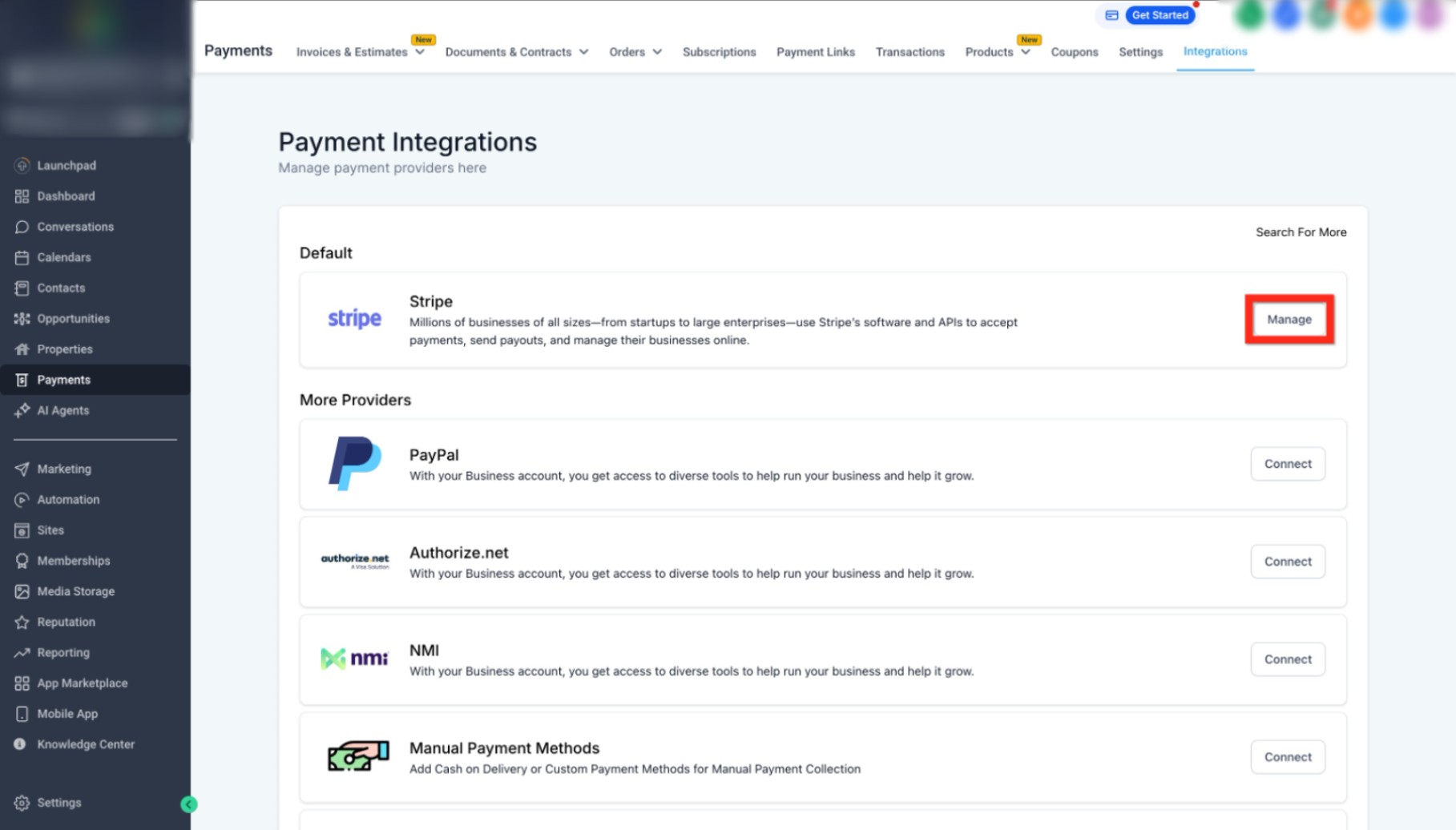
This image highlights the Stripe option and the Connect button.
Find Stripe under available providers
Click Connect to proceed
Step 3: Sign In or Create Your Account
You will be redirected to a secure login page to authenticate your Stripe account.
Enter your Stripe credentials
Or create a new account if needed
Step 4: Authorize the Connection
Grant the necessary permissions to complete the integration.
Review access permissions
Click Authorize to finalize the connection
Once complete, your account will be successfully connected.
Step 5: Confirm and Manage Integration
After connecting, you will see the option to manage your integration.
Verify the connection status
Click Manage to update or review settings
Best Practices for Payment Setup
Following these recommendations helps ensure smooth payment processing:
Use a verified Stripe account before connecting
Double-check account permissions during setup
Test payments after integration to confirm functionality
Keep billing and product data organized for accurate reporting
Frequently Asked Questions
Q: What happens after I connect Stripe?
You can immediately start accepting payments, subscriptions, and transactions.
Q: Can I disconnect Stripe later?
Yes, you can manage or disconnect the integration at any time from the integrations page.
Q: Do I need a Stripe account before connecting?
Yes, you will need to sign in or create one during the setup process.
Q: Is payment information stored securely?
Yes, all payment data is handled securely through the payment provider.
Q: Can I use multiple payment providers?
Yes, you can connect additional providers depending on your needs.
Need More Help?
If you need assistance setting up payments or troubleshooting your connection, visit the Help Center or contact support for guidance.
Was this article helpful?
Related articles
- How to Create Products and Sell Them Using FunnelsSelling online becomes simple when your products, funnel, and checkout are properly connected. This guide walks through creating a product, making it available inside a funnel, and setting up an order form for seamless purchases. Following these steps ensures customers can easily view, select, and cCommerce
- Build, Launch, and Sell Your Online CourseBuilding and selling an online course doesn’t have to be complicated. With the right setup, you can quickly turn your knowledge into a structured product, package it into an offer, and start sharing it with your audience. This guide walks through the full process—from creating your course to publishCommerce
- Streamlined Payment Collection with Shareable Payment LinksAccepting payments should be simple, fast, and frictionless. Payment links allow you to send a direct checkout experience to customers so they can complete purchases quickly without needing a full website or manual invoicing. This improves conversion rates, reduces delays, and creates a smoother buCommerce