What are integrations?
CPR Enroll+ connects with a carefully selected set of external platforms to extend its capabilities — handling payments, syncing class rosters, automating marketing, and verifying addresses. This article provides an overview of all current integrations and where to configure each one.
Current Integrations
Integration | Purpose | Where to Configure |
Stripe | Payment processing for class registrations, store purchases, and invoices | Settings > Payment Gateway |
Google Maps | Address autocomplete when entering locations, instructor addresses, and student records | Automatic — active on all address fields |
| GoHighLevel | Bring your own CRM — connect an existing GoHighLevel account instead of using ResQEngage | Settings > Integrations & Connections |
ResQEngage | Managed CRM and marketing automation — leads, follow-up campaigns and messaging, run for you inside the ResQWare ecosystem | Sync buttons appear on relevant user and instructor records |
| Agency Connect | Chrome extension that posts your classes and issues certificates on certification-body portals | Settings > Integrations & Connections > Certification Bodies |
1. Stripe Integration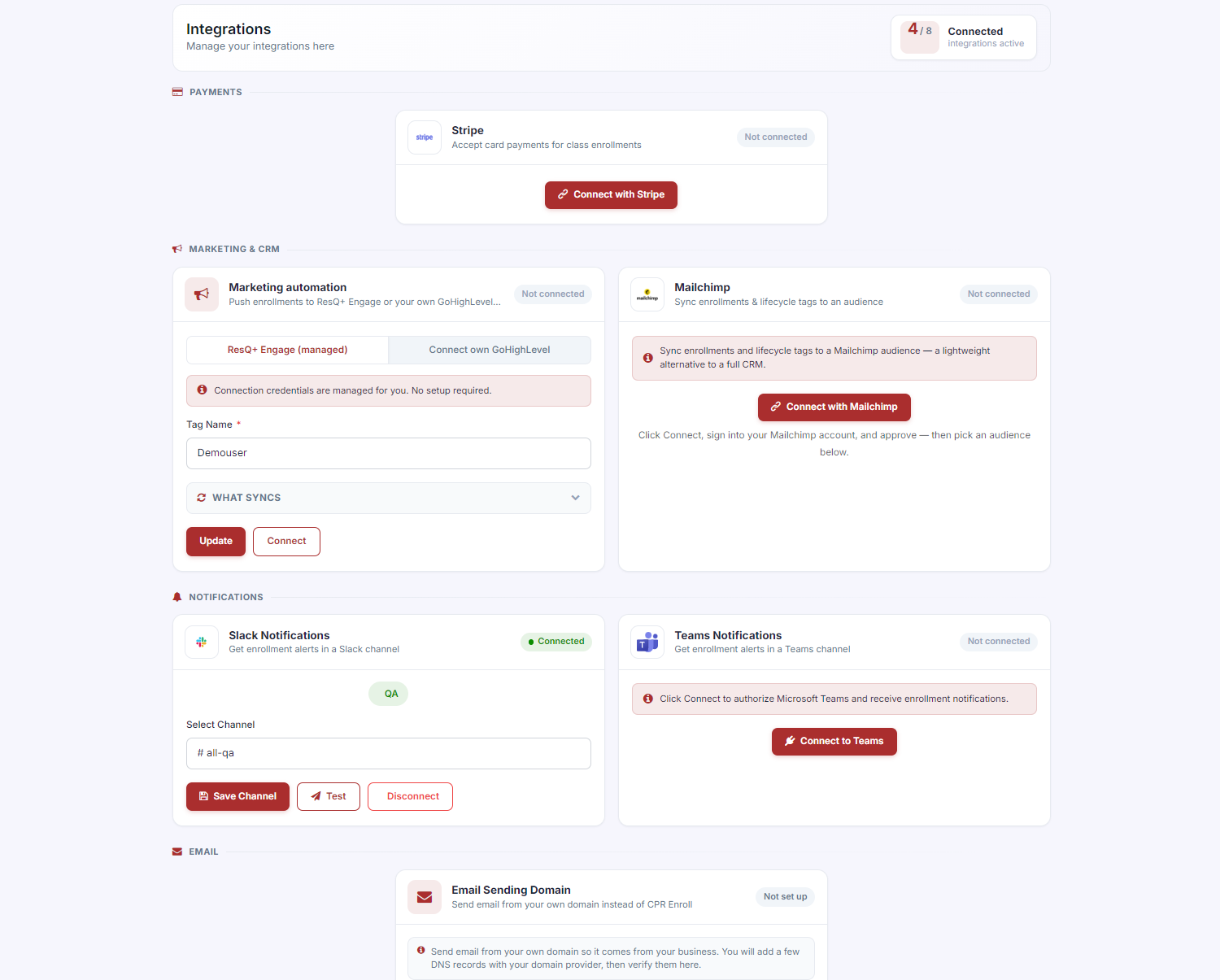
Stripe is the payment backbone of CPR Enroll+. All student payments — class registrations, store purchases, invoice payments, and add-ons — are processed through your connected Stripe account. See Setup & Connecting Your Stripe Account for setup instructions.
Optimized Checkout Experience: Integration with Stripe allows you to offer a seamless, one click payment experience. By reducing friction at checkout, you ensure that students who land on your page actually complete their enrollment.
Global Payments with Local Impact: Whether you are a local hero or expanding across borders, Stripe’s global payment platform allows you to accept hundreds of payment methods securely. This ensures you never miss a sale due to payment limitations.
Unified Financial Management: Say goodbye to fragmented reporting. Stripe’s unified dashboard works with CPR Enroll to manage course enrollments, merchandise, and subscriptions in one place, providing real time insights into your revenue.
2. ResQEngage Integration
ResQEngage gives you access to a platform built specifically to Capture, Nurture, and Close more leads. ResQEngage acts as your digital sales force, ensuring no student inquiry goes unanswered.
Capture More Leads: Use ResQEngage’s full suite of tools, including high converting landing pages, surveys, and forms, to bring more students into your ecosystem. Features like Missed Call Text Back ensure that even if you’re busy teaching, you never lose a potential customer.
Automated Lead Nurturing: The "secret sauce" of ResQEngage is its ability to automate follow ups. You can create custom messaging campaigns via SMS, email, and even voicemail drops to nurture prospects until they are ready to book a class.
Comprehensive CRM and Reputation Management: Manage your entire student database in one place. Beyond just tracking sales, ResQEngage helps you manage your online reputation by automating review requests, ensuring your CPR business remains the top rated choice in your area.
Google Maps
Google Maps address autocomplete is active on every address field in CPR Enroll+ — when creating locations, adding instructor profiles, or entering student addresses. Start typing an address and a dropdown of matching suggestions appears. Select one to auto-fill the complete, validated address. No configuration is needed.
CRM and Marketing Automation
Marketing automation and CRM run through one of two options, depending on whether you want it managed for you or you already have your own stack.
- ResQEngage — the managed option. The CRM is set up and run for you inside the ResQWare ecosystem, and sync buttons appear on the relevant user and instructor records.
- GoHighLevel — the bring-your-own option. If you already run your own GoHighLevel account, connect that instead.
Either way, student and enrollment data flows across so follow-up campaigns fire off real activity rather than a stale list. See How to Integrate ResQEngage & Stripe with CPR Enroll? for setup instructions.
Previously called LeadsWell.
Certification Bodies
Certification-body integrations live under Settings > Integrations & Connections, in the Certification Bodies section. They let CPR Enroll+ post your classes and issue certificates in the certifying agency’s own portal instead of you rekeying every roster by hand.
The work is done by Agency Connect, a Chrome extension that signs in as you, fills the agency portal from your finalized roster, and stops so you can review and click Submit yourself. Four cards sit in this section:
- Agency Connect — the extension itself, with the Chrome Extension — Pairing & Devices panel for pairing a browser and revoking one.
- HSI / ASHI — posts classes and issues certificates in HSI’s OTIS portal.
- American Heart Association — posts classes in Atlas and assigns eCards to students. Marked Coming soon.
- American Red Cross — requests classes and reports course records in the Red Cross Learning Center.
• What Is Agency Connect and How Do Assisted Runs Work? — what an assisted run is and how to start one from a class.
• Setting Up Agency Connect for HSI and American Red Cross — pairing, login URLs, instructor IDs and per-agency settings.
• Course Mapping and Managing Vouchers & Codes — mapping your courses to agency programs and handling vouchers.
Connections — Internal Networking
Connections is not a third-party integration, but it is often thought of as one. Connections is CPR Enroll+'s built-in networking feature that lets your organization discover and collaborate with other training organizations on the platform. Find it in Connections.
Was this article helpful?
Related articles
- Setting Up White-Label Email (Email Sending Domain)By default, system emails go out from CPR Enroll. White-Label Email lets them come from your own domain instead, so students see your brand in the From line rather than ours. Before You Begin - Find it at Settings → Integrations & Connections, in the Email section — Email Sending Domain. Until it isGetting Started
- Connecting Mailchimp, Slack, and Microsoft TeamsMailchimp, Slack and Microsoft Teams all connect from the same place, and all three do the same basic job: get what happens in CPR Enroll in front of the people who need to know about it. Mailchimp syncs your students to an audience; Slack and Teams put enrollment alerts in a channel. Before You BegGetting Started
- Enabling Apple and Google Wallet PassesStudents can save their certification to Apple Wallet or Google Wallet, so it lives on their phone without a portal login. It is one of the cheapest wins in the platform — two toggles, and your students stop emailing you for copies of their card. Before You Begin - Find it at Settings → IntegrationsGetting Started