How Referral Attribution and Points Work
This article explains how a click becomes a redeemable point, and why there is a waiting period before you can cash out.
Before You Begin
- You must have joined the affiliate program to see any of these figures.
- Attribution is automatic. There is nothing to tag, configure or claim.
- Points are only redeemable on confirmed business, which is why a holding period exists.
How Attribution Is Tracked
Attribution is first-party and server-side, designed to survive blocked cookies and month-to-month renewals. The chain is:
| Step | What happens |
|---|---|
| 1. Click | Logged on our own domain. |
| 2. First-party cookie | A 60-day window opens. |
| 3. Stamped to account | Made permanent at signup. |
| 4. Conversion | A paid invoice via Stripe. |
| 5. Points | Awarded, including on renewals. |
✔ Step 3 is the one that matters. Once a referred organization signs up, they are linked to you permanently, so your points keep coming even if cookies are cleared. Attribution does not expire after the 60-day cookie window once the account exists.
The Point Lifecycle
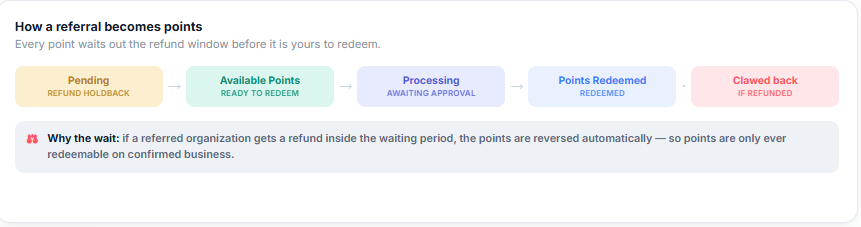
Points move through five states, shown as a flow on the Affiliate Center page:
| State | Meaning |
|---|---|
| Pending | Refund holdback — the waiting period is running. |
| Available Points | Ready to redeem. |
| Processing | Redemption requested, awaiting approval. |
| Points Redeemed | Paid out or applied. |
| Clawed back | Reversed because the referred purchase was refunded. |
Why the Wait?
If a referred organization gets a refund inside the waiting period, the points are reversed automatically — so points are only ever redeemable on confirmed business. The In progress counter shows exactly how many days remain (45 days at the time of writing).
Reading Your Campaign Performance
The Your Campaign Performance table breaks results down per campaign, with columns for Campaign, Code, Clicks, Referrals and Points Earned.
A high click count with zero referrals usually means the audience is browsing rather than buying. Check the Organizations You Referred table, which lists signups that have not yet paid — those are conversions in progress rather than failures.

Best Practices
- Do not panic at a Pending balance. It is the refund holdback doing its job, not a problem with your account.
- Compare clicks to referrals per campaign rather than in aggregate — one weak campaign can hide a strong one.
- Remember that renewals earn points too. A referred organization keeps paying you over its lifetime, not just at signup.
- If a point balance drops, check for a clawback: it means a referred purchase was refunded.
Frequently Asked Questions
| Question | Answer |
|---|---|
| Does attribution expire after 60 days? | The cookie window is 60 days, but once the referred organization signs up, the link is permanent. |
| Do I earn on renewals or only the first payment? | On renewals too. Points are awarded whenever a referred invoice is paid. |
| Why are my points Pending? | The refund holdback period is running. The In progress counter shows the days remaining. |
| What is a clawback? | A reversal that happens when a referred purchase is refunded. |
| I have lots of clicks and no referrals. What now? | Check Organizations You Referred — signups that have not paid yet appear there, not in your referral count. |
✔ That’s the money trail. Next, read Sharing Affiliate Links, Codes, and Marketing Materials to put your links to work.
Was this article helpful?
Related articles
- Joining the CPR Enroll Affiliate ProgramThe Affiliate Center lets you earn rewards for referring new customers to CPR Enroll subscriptions and add-ons. The program is created and managed centrally, so there is nothing for you to administer — you join, share your links, and track results. Before You Begin - The Affiliate Center sits under Affiliate Center
- Sharing Affiliate Links, Codes, and Marketing MaterialsYour affiliate links and codes are the working end of the program. This article covers where to find them, when to use a link versus a code, and how to use the supplied marketing assets. Before You Begin - You must have joined the affiliate program to see your links and codes. - Every campaign code Affiliate Center
- Redeeming Points and Choosing a Payout MethodPoints are earned automatically. Turning them into credit or cash is a deliberate step you take, and this article covers how. Before You Begin - Only the balance shown under Available to redeem can be redeemed. Points still in Pending are inside the refund holdback window. - Credit is the working paAffiliate Center