Joining the CPR Enroll Affiliate Program
The Affiliate Center lets you earn rewards for referring new customers to CPR Enroll subscriptions and add-ons. The program is created and managed centrally, so there is nothing for you to administer — you join, share your links, and track results.
Before You Begin
- The Affiliate Center sits under Grow in the left navigation.
- Joining is free and takes one step. Your referral tools and earnings dashboard unlock immediately.
- If you intend to take cash payouts, be ready to complete the verification checklist (W-9, identity, bank).
Step-by-Step Instructions
Step 1: Join the Program
- Click Affiliate Center in the left navigation, under Grow.
- Follow the prompt to join the affiliate program.
- Your referral tools and earnings dashboard unlock immediately.
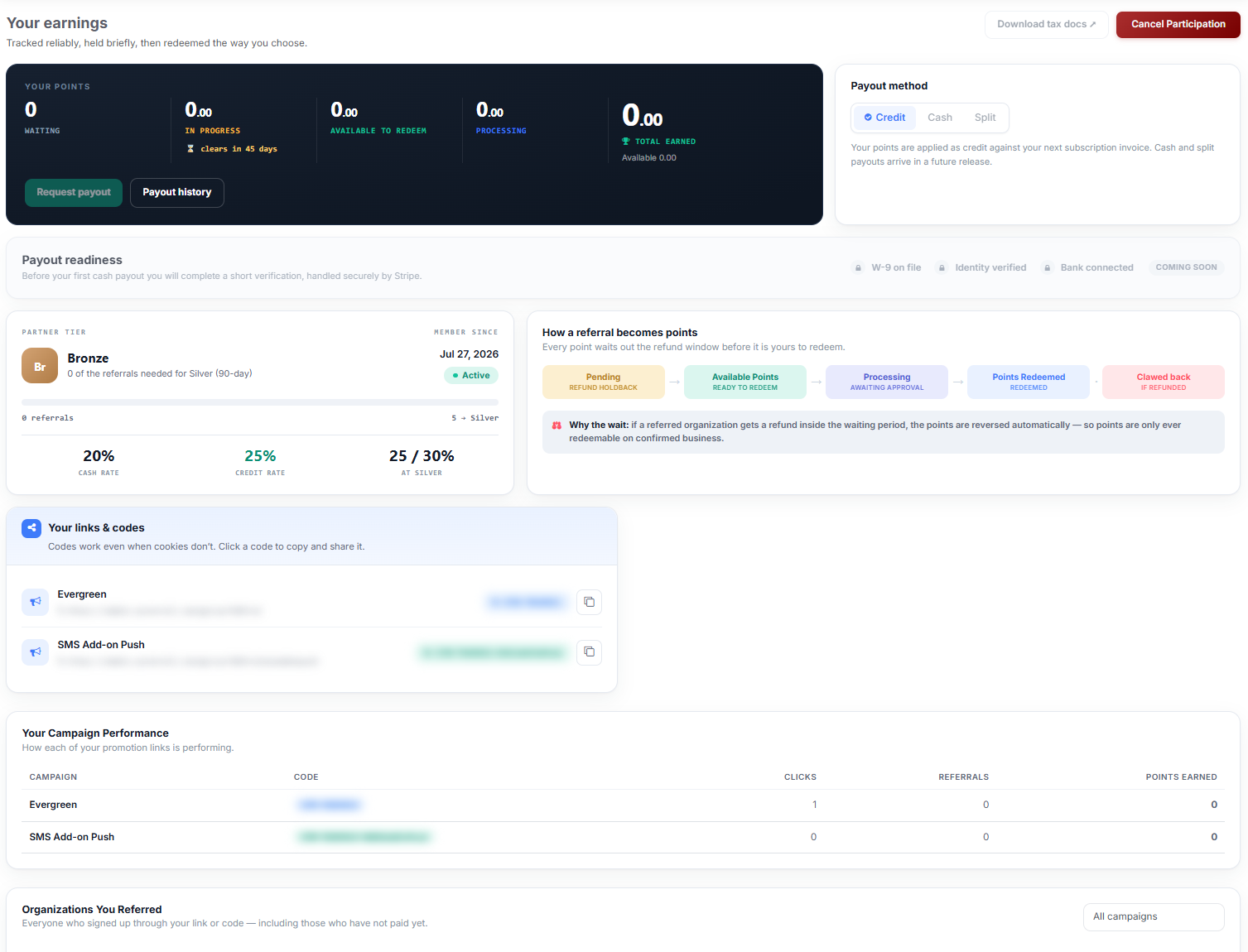
Once you are in, the top of the page reads Your earnings — “Tracked reliably, held briefly, then redeemed the way you choose.”

What the Page Shows
| Panel | What it contains |
|---|---|
| Your points | Five counters: Waiting, In progress (with days until it clears), Available to redeem, Processing, and Total earned. |
| Payout method | Credit, Cash or Split. |
| Payout readiness | The verification checklist for cash payouts — W-9 on file, Identity verified, Bank connected. |
| Partner tier | Your tier, member-since date, referral count and current rates. |
| Your links & codes | Your campaign links and copyable codes. |
| Your campaign performance | Clicks, referrals and points earned per campaign. |
| Organizations you referred | Everyone who signed up through your link or code, including those who have not paid yet. |
| Marketing materials | Downloadable email, social and banner assets. |
Partner Tiers
New affiliates start at Bronze. The tier card shows how many referrals remain before the next tier and the rate at each level — for example, 20% cash rate and 25% credit rate at Bronze, rising to 25% / 30% at Silver after five qualifying referrals in a rolling 90-day window.
✔ The tier window is rolling, not calendar-based. Five qualifying referrals in any rolling 90-day period moves you up — you do not have to fit them into a quarter.
Leaving the Program
Click Cancel Participation in the top right of the Affiliate Center. Points already redeemed are unaffected.
Best Practices
- Complete the payout readiness checklist before you have points to redeem, not after — verification takes longer than redemption does.
- Check Organizations You Referred as well as your point counters. Signups that have not paid yet appear there and nowhere else.
- Use the supplied marketing materials rather than writing your own — they are kept current with the product.
- Pick your payout method deliberately. Credit is applied to your own subscription; cash requires full verification.
Frequently Asked Questions
| Question | Answer |
|---|---|
| Does it cost anything to join? | No. Joining is free and unlocks your tools immediately. |
| What tier do I start at? | Bronze. |
| What do I need before I can take a cash payout? | A W-9 on file, verified identity, and a connected bank account. |
| Can I see people who signed up but have not paid? | Yes, in the Organizations You Referred table. |
| What happens to my points if I leave the program? | Points already redeemed are unaffected. Use Cancel Participation in the top right. |
✔ You’re enrolled. Next, read How Referral Attribution and Points Work to understand how a click becomes a redeemable point.
Was this article helpful?
Related articles
- How Referral Attribution and Points WorkThis article explains how a click becomes a redeemable point, and why there is a waiting period before you can cash out. Before You Begin - You must have joined the affiliate program to see any of these figures. - Attribution is automatic. There is nothing to tag, configure or claim. - Points are onAffiliate Center
- Sharing Affiliate Links, Codes, and Marketing MaterialsYour affiliate links and codes are the working end of the program. This article covers where to find them, when to use a link versus a code, and how to use the supplied marketing assets. Before You Begin - You must have joined the affiliate program to see your links and codes. - Every campaign code Affiliate Center
- Redeeming Points and Choosing a Payout MethodPoints are earned automatically. Turning them into credit or cash is a deliberate step you take, and this article covers how. Before You Begin - Only the balance shown under Available to redeem can be redeemed. Points still in Pending are inside the refund holdback window. - Credit is the working paAffiliate Center