How to connect Instagram account with Facebook page?
Below is the step-by-step guide to Connect Your Instagram Account to a Facebook Page. To run ads on Instagram via Ad Manager, you must connect your Instagram Business Account to your Facebook Page. Once the Instagram account is connected to Facebook page, it will automatically be selected whenever the Facebook page is chosen to publish an ad. This setup is to be done from the Meta platform.
Step 1: Switch to an Instagram Business or Creator Account
Note: Skip this step if your Instagram is already a Business Account.- Open Instagram App and go to your profile.
- Tap the hamburger(☰) Menu (top right) to land on Settings and activity.
- Scroll down and tap Account type and tools > Switch to professional account.
- Choose Business (recommended for ads) or Creator.
- Select your Business Category (e.g., E-commerce, Health & Wellness).
- Tap Next, and follow the prompts to complete the setup.
Step 2: Connect Instagram to your Facebook Page
A: Via Facebook Page Settings (Recommended)
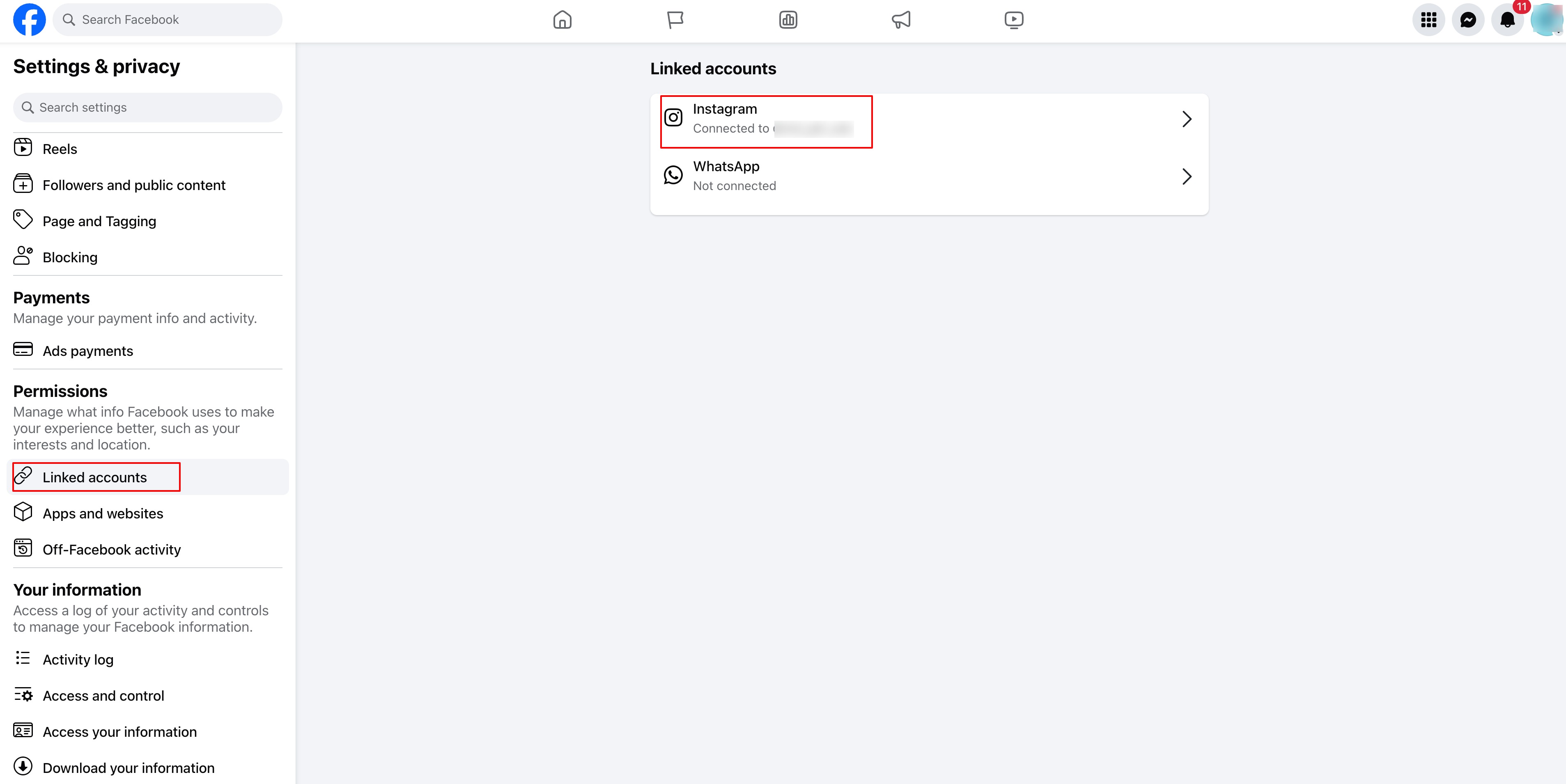
- Go to Facebook and open your Business Page.
- Click Settings (left sidebar).
- Select Linked Accounts > Instagram.
- Click Connect Account and log in to your Instagram account.
- Ensure the option Allow Access to Messages & Connected Experiences is enabled.
- Click Confirm to complete the connection.
B: Via Instagram App(this option will be available if you have a professional account)
- Go to your Instagram Profile.
- Tap Edit Profile → Scroll to Public Business Information.
- Tap Page → Connect or Create a Facebook Page.
- Select your existing Facebook Page or create a new one.
- Tap Done to save changes.
Step 3: Verify the Connection in Meta Business Suite
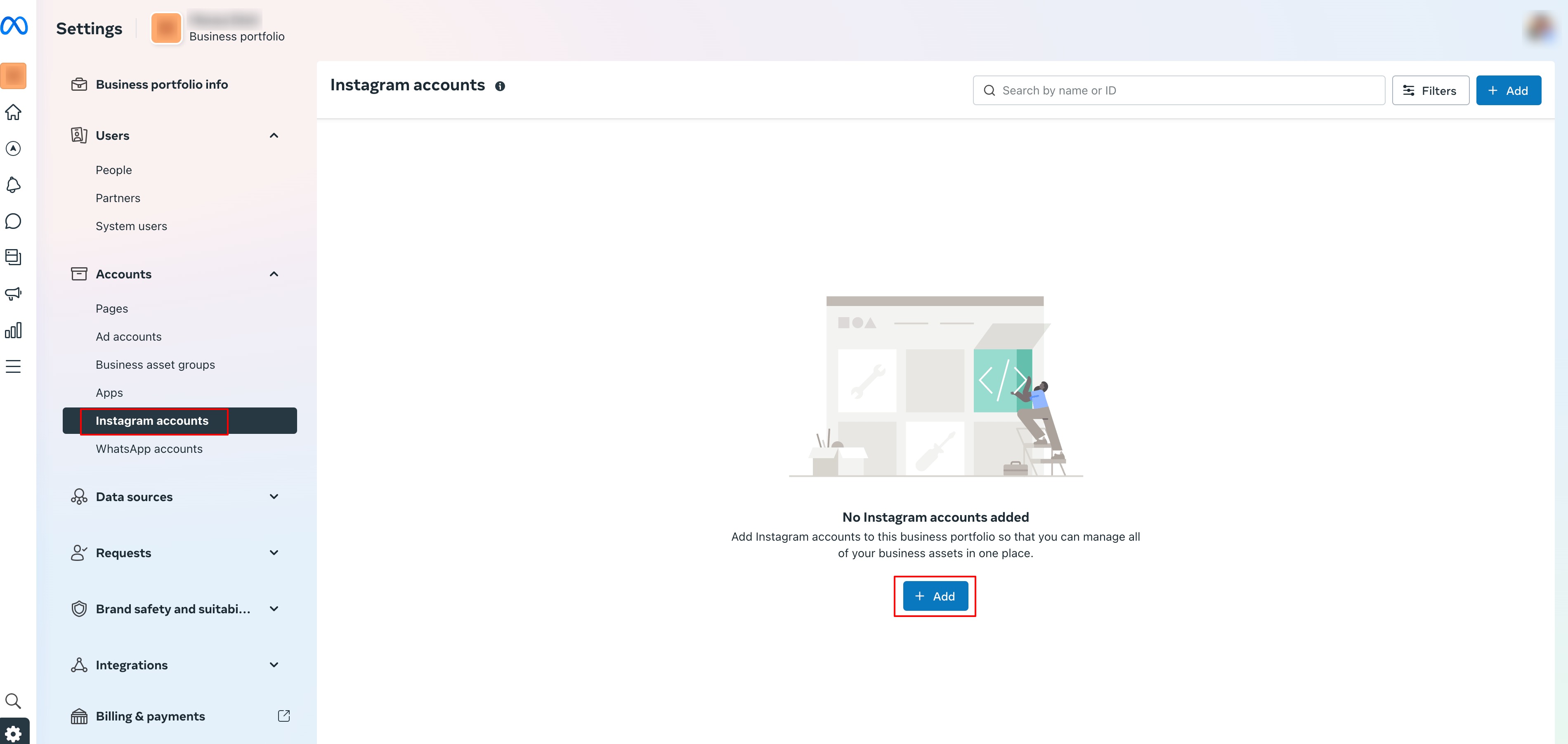
- Open Meta Business Suite (business.facebook.com)
- Click Settings → Instagram Accounts.
- Your Instagram account should be listed.
- If not, click Add Instagram Account and follow the login steps.
Final Check:
- Instagram is set as a Professional Account.
- Connected to the correct Facebook Page.
- Verified in Meta Business Suite.
Note: Only one Instagram account can be connected to a Facebook page.Was this article helpful?
Related articles
- Create a new Google Search Ad CampaignAd Manager allows you to run the ad campaigns on Google. Your Google Ads campaign is entirely in your control: design your ad content, choose your daily budget and set a specific target audience with geography and languages. TABLE OF CONTENTS - Step 1 | Create Campaign - Step 2 | Ad Content- Add Ad Manager
- Guidelines for using custom questions in Google lead formsWhen creating a lead form using Ad Manager for Google Ads, you may want to ask custom questions to better qualify your leads. However, Google enforces strict guidelines for what kinds of questions are allowed. This article explains what types of custom questions are approved, and how to avoid issuesAd Manager
- How to create a Facebook form in Ad ManagerIn this article we will discuss in detail about the steps to be taken to create a new Facebook lead form, used for the Lead Generation objective of Meta ads. TABLE OF CONTENTS - How to create new Facebook Form? - How to use custom fields in Ad Manager? - How to review, map and duplicate existing FaAd Manager
- How to create a Meta Business Manager and Ad account?In this article we will be highlighting the steps that should be taken to create a Meta BM and an ad account under it. Once the ad account is created, same will be used to connect with Ad Manager and seamlessly publish ad campaigns. TABLE OF CONTENTS - Video on how to create a Meta BM - Brief summarAd Manager