Workflow action: Generate Marketing Audit Report
TABLE OF CONTENTS
Overview
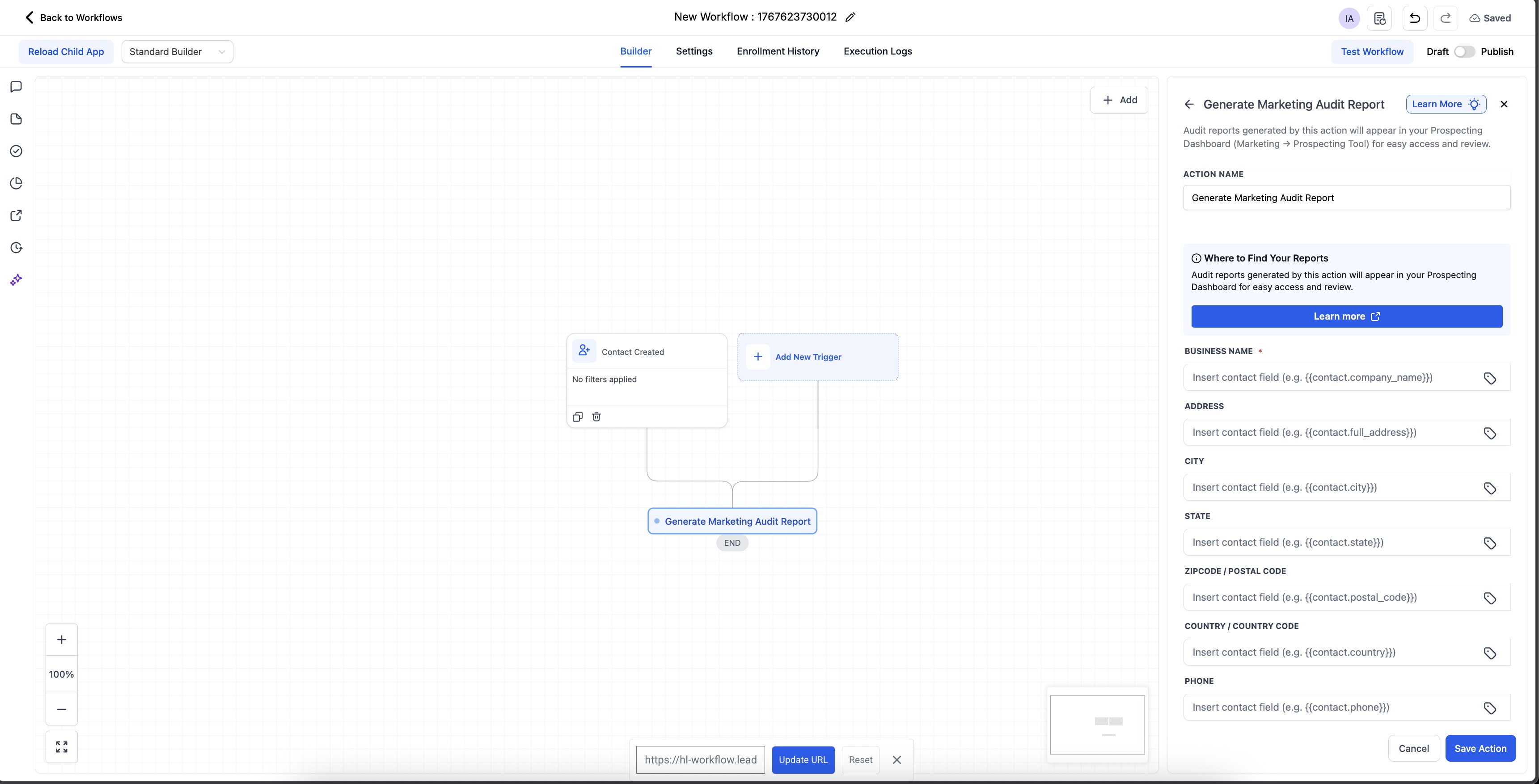
The Marketing Audit Report Generation workflow action allows you to automatically create a Marketing Audit Report for every new lead (contact) added to your sub-account. With workflow automation, you can instantly enrich new contacts, understand their online presence, and personalize follow-up outreach — all without manual effort.
To use this action, ensure the Prospecting Tool is enabled and subscribed on your sub-account.
Note: Previously, marketing audits could only be generated for leads created inside the Prospecting Tool. With this new workflow action, you can now generate audits for any contact from any source — Facebook Ads, funnels, forms, imports, integrations, webinars, or any other channel.
Action Name
Generate Marketing Audit Report
Action Description
This workflow action automatically generates a Marketing Audit Report for a contact by using the details available in their profile, such as:
Business Name
Website URL
Address
Email
Phone Number
The more complete the contact’s information is, the more accurate and detailed the audit will be.
What is Marketing Audit Report
The Marketing Audit Report is a powerful, automated snapshot of a business’s local marketing presence. It analyzes key areas like business listings accuracy, website performance, Google Business Profile , SEO rankings, and online reputation.
These insights help you identify gaps in your online presence, understand what’s impacting your growth, and take informed next steps — making the report useful for improving performance, onboarding new customers, or planning future marketing efforts.
Action Details
Prerequisites
Your sub-account must have an active Prospecting Tool subscription.
Ensure that the Prospecting Tool is enabled in your account.
Add the action into a workflow that triggers when a contact is available (recommended trigger: Contact Created).
How It Works
A contact enters your workflow.
The Generate Marketing Audit Report action runs automatically.
Prospecting Tool uses the contact’s available business information such as business name, website, email etc to recoganize the right business entity and then run detailed audit for it
The generated report is attached to that prospect inside the Prospecting Tool.
Duplicate Prevention (Important Note)
For contacts originally created by the Prospecting Tool, we automatically prevents:
Duplicate marketing audit reports
Re-triggering the same audit workflows
This ensures clean data and avoids unnecessary audit generation for leads already handled by the Prospecting Tool.
Where to Find the Generated Audit
Once the workflow runs:
- Navigate to Marketing → Prospecting Tool (if can't see 'Prospecting' tab: it's probably prospecting is not enabled for your account)
Open the Prospecting tab.
Search for the specific prospect/contact.
You’ll see the newly generated Marketing Audit Report for that contact.
Example
Use Case: Audit Every New Lead Automatically
You want to audit all new contacts coming in — from Facebook Ads, funnels, events, referrals, imports, or anywhere else.
Create a workflow with Trigger: Contact Created.
Add the Generate Marketing Audit Report action.
Publish the workflow.
Now, every new contact added to your CRM will automatically:
Have its business details analyzed
Receive a custom Marketing Audit Report
Appear inside the Prospecting Tool for review
This gives your team immediate insights and helps tailor outreach to each lead’s current marketing performance.
Was this article helpful?
Related articles
- How to Resell and use Prospecting Tool for Sub-AccountsThe Prospecting Tool for Sub-Accounts empowers agencies to provide their sub-accounts with the ability to search for new business prospects, generate marketing audit reports, and customise prospecting efforts based on niches, location, and other preferences. This tool is particularly useful for agenProspecting Tool
- How to send Marketing Audit Report as Email/SMS to your ProspectsMarketing audit reports provide valuable insights to your prospects about their online presence, website performance, and marketing gaps. Now, you can seamlessly send these reports via Email or SMS to engage prospects effectively. Please note this is available only at the 'Sub Account Level ProspeProspecting Tool
- How to Customize Prospecting Report with Report BuilderWe’re excited to introduce a major upgrade to your Prospecting Reports experience: A completely redesigned Web Report UI and a powerful Report Builder that gives you total control over how your reports look and feel. This update is all about helping customers tell their brand story, create better fProspecting Tool
- Enable Prospecting Access for Accounts: Complete Setup GuideProviding controlled access to prospecting tools allows individual accounts to independently discover leads, generate reports, and manage outreach activities. This feature ensures each account operates within its own dedicated workspace while maintaining centralized control over access and availabilProspecting Tool