How to Setup Privacy Policy
A Privacy Policy explains to your students how you collect, use, and store their personal information. Publishing a Privacy Policy is a legal requirement in many jurisdictions and is considered best practice for any business that collects student data. CPR Enroll+ makes it easy to link your Privacy Policy to your registration pages.
This article walks you through linking your Privacy Policy and configuring related compliance links.
Before You Begin
- Have your Privacy Policy already published somewhere on your own website, or plan to create one using a free or low-cost generator.
- Gather the URLs for any related compliance pages you want to link — Refund Policy, Disclaimer, and Class Terms & Conditions.
ℹ Do I need a Privacy Policy? If you are accepting online registrations and collecting student names, emails, and payment information, you are almost certainly required to have a Privacy Policy under GDPR (EU), CCPA (California), and similar laws. CPR Enroll+ stores student data securely on your behalf, but your Privacy Policy should disclose this. Consult a legal professional for advice specific to your situation.
Step-by-Step Instructions
Step 1: Link Your Privacy Policy
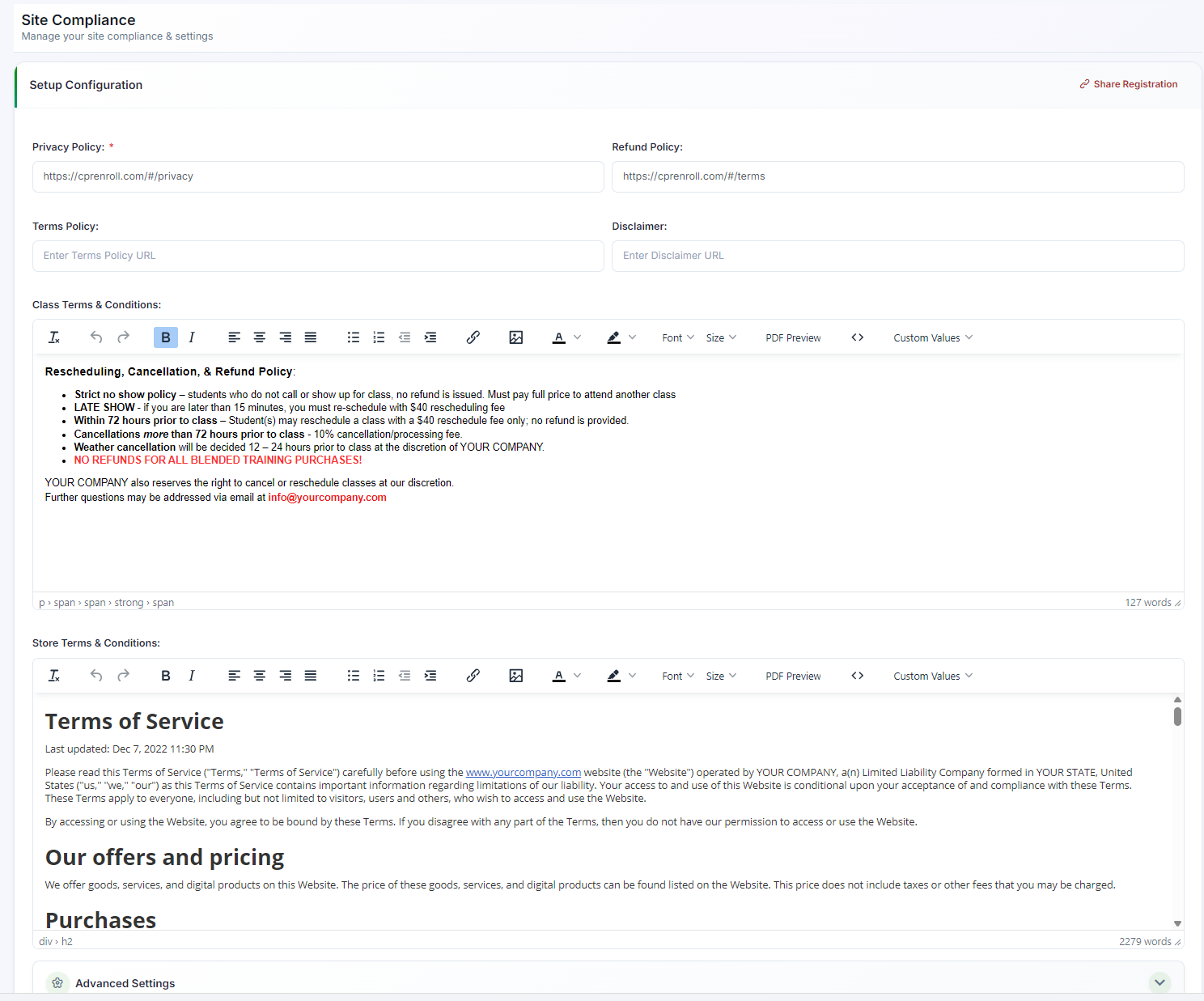
- From the sidebar, go to Settings > Site Compliance.
- Find the Privacy Policy URL field.
- Enter the full URL of your Privacy Policy page on your website (e.g.,
https://yourwebsite.com/privacy-policy). - Click Save. A "Privacy Policy" link will now appear in the footer of your student registration pages.
Click Save. A "Privacy Policy" link will now appear in the footer of your student registration pages.
Step 2: Configure Other Compliance Links
In the same Settings > Site Compliance section, you can also configure:
- Refund Policy URL — link to your refund policy page.
- Disclaimer URL — link to any disclaimer or waiver page.
- Class Terms & Conditions — in-line text or link (see Your NEW Setup Guide: Set Up Terms and Conditions).
Step 3: Write a Privacy Policy (If You Don't Have One)
If you do not already have a Privacy Policy, there are several free and low-cost generators available online. Your policy should at a minimum cover:
- What data you collect (name, email, payment info).
- How you use it (class management, certification records).
- Who you share it with (certification bodies like AHA or ARC for card issuance).
- How students can request deletion of their data.
Best Practices
- Keep your Privacy Policy URL current — if you move or update the page, update the link in Site Compliance right away.
- Fill in Refund Policy and Disclaimer links alongside your Privacy Policy for complete, transparent coverage.
- Review your Privacy Policy periodically to make sure it still reflects how you actually collect, use, and share student data.
- When in doubt about legal requirements for your jurisdiction, consult a legal professional rather than relying solely on a generic generator.
Frequently Asked Questions
| Question | Answer |
|---|---|
| Where does the Privacy Policy link appear to students? | It appears as a "Privacy Policy" link in the footer of your student registration pages. |
| Is a Privacy Policy legally required? | In most cases, yes, if you collect student names, emails, and payment information online. Laws such as GDPR and CCPA typically require one. Consult a legal professional for advice specific to your situation. |
| What should my Privacy Policy cover at a minimum? | What data you collect, how you use it, who you share it with (such as certification bodies), and how students can request deletion of their data. |
✔ You're all set. Your Privacy Policy is now linked and visible to students on your registration pages.
Was this article helpful?
Related articles
- Selecting your Time ZoneSetting the correct time zone in CPR Enroll+ is critical for class scheduling accuracy. If your time zone is set incorrectly, class times will display incorrectly on student registration pages and in email confirmations — leading to missed classes and student frustration. This article walks you throGetting Started
- How can I change the Logo of my Account?CPR Enroll+ uses two separate logo upload areas: one for your student-facing registration pages (Branding), and one for your business profile and internal documents. Make sure you upload to both for a consistent experience across your account. This article walks you through uploading your registratiGetting Started
- Is There Any Way to Change the Profile Picture?Profile pictures in CPR Enroll+ are associated with individual user accounts. Administrators and instructors with portal access can update their own profile pictures through their account settings, and administrators can also update profile pictures on behalf of any instructor. This article walks yoGetting Started
- How do I customize my profile page?Your profile page in CPR Enroll+ lets you personalize your presence within the platform and, for instructors, set up an email signature that is automatically included in student communications. This article covers updating your basic profile information and configuring an instructor email signature.Getting Started