Call Forwarding to Your LeadConnector Phone Number
This guide explains how to set up call forwarding from your personal phone—whether it’s a cell phone or landline—to your LeadConnector phone number. This allows you to use ResQEngage's Voice AI without changing your existing branded phone number on business cards, websites, or online directories. Follow the step-by-step instructions below based on your phone carrier.
TABLE OF CONTENTS
- Why Forward Calls Into ResQEngage?
- How Call Forwarding Works
- Setting Up Call Forwarding for Major Carriers
- Frequently Asked Questions
Why Forward Calls Into ResQEngage?
Call forwarding allows you to seamlessly connect your personal or business phone number with ResQEngage's Voice AI system. By forwarding calls to your ResQEngage phone number, you can:
- Leverage Voice AI: Enhance customer communication with AI-powered call handling and transcription.
- Maintain Your Existing Number: Keep your current phone number visible to customers without needing to update it on marketing materials or directories.
- Streamline Operations: Ensure all incoming calls are managed through your ResQEngage account for better tracking and management.
How Call Forwarding Works
When call forwarding is enabled, incoming calls to your personal number (cell or landline) will be automatically redirected to your ResQEngage phone number. ResQEngage then handles the calls using its advanced Voice AI capabilities.
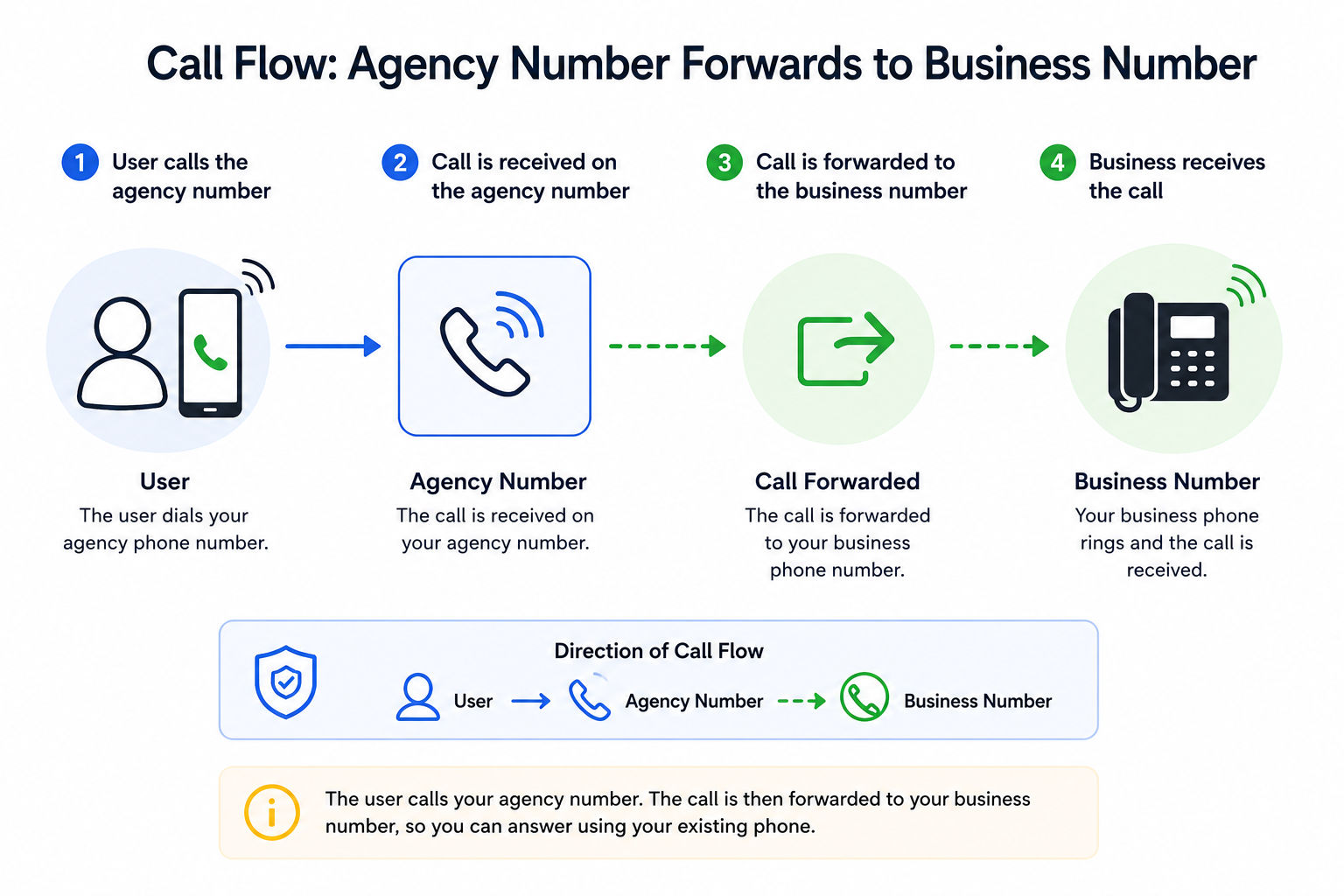
Setting Up Call Forwarding for Major Carriers
Follow the steps below based on your carrier. If you don’t see your carrier, refer to their specific support page for detailed instructions.
Verizon Wireless
- There are a few ways to forward calls from your Verizon Wireless phone to your ResQEngagephone number:
- To Forward ALL CALLS: dial *72 followed by your ResQEngage phone number (e.g.,
*72 555-555-5555). - To Forward MISSED CALLS (unanswered calls or calls that receive a busy signal): Dial *71 followed by your ResQEngage phone number (e.g.,
*71 555-555-5555).
- To Forward ALL CALLS: dial *72 followed by your ResQEngage phone number (e.g.,
- Press Call.
- Wait for a confirmation tone or message.
- To deactivate call forwarding, dial *73.
Learn More at Verizon Wireless Support
AT&T (Mobile)
- Dial *21 followed by your ResQEngage phone number (e.g.,
*21 555-555-5555). - Press Call or Send.
- Wait for the confirmation tone.
- To deactivate, dial #21#.
Learn More at AT&T Wireless Support
AT&T (Business)
- Dial *72 on your landline phone and listen for the dial tone.
- Enter your ResQEngage phone number (e.g.,
555-555-5555). - Wait for the confirmation tone. The system will then place a call to the number to which calls will be forwarded. If the forward-to party answers the call, the feature is activated.
- To deactivate call forwarding, dial *73.
Learn More at AT&T Business Support
T-Mobile
- There are a few ways to forward calls from your T-Mobile phone to your ResQEngagephone number:
- To Forward ALL CALLS: dial **21*1 + your ResQEngage phone number + # (e.g.,
**21*1555-555-5555#) - To Forward MISSED CALLS (unanswered calls or calls that receive a busy signal): Dial **61*1 + your ResQEngage phone number + # (e.g.,
**61*1555-555-5555#).
- To Forward ALL CALLS: dial **21*1 + your ResQEngage phone number + # (e.g.,
- Press Call.
- To deactivate call forwarding, dial ##61# or ##21#, respectively.
Learn More at T-Mobile Support
Xfinity Mobile
- There are a few ways to forward calls from your Xfinity Mobile phone to your ResQEngagephone number:
- To Forward ALL CALLS: dial *72 followed by your ResQEngage phone number (e.g.,
*72 555-555-5555). - To Forward MISSED CALLS (unanswered calls or calls that receive a busy signal): Dial *71 followed by your ResQEngage phone number (e.g.,
*71 555-555-5555).
- To Forward ALL CALLS: dial *72 followed by your ResQEngage phone number (e.g.,
- Press Call.
- Listen for a confirmation tone.
- To turn off call forwarding, dial *73.
Learn More at Xfinity Mobile Support
Spectrum Mobile
- There are a few ways to forward calls from your Spectrum Mobile phone to your ResQEngagephone number:
- To Forward ALL CALLS: dial *72 followed by your ResQEngage phone number (e.g.,
*72 555-555-5555). - To Forward MISSED CALLS (unanswered calls or calls that receive a busy signal): Dial *71 followed by your ResQEngage phone number (e.g.,
*71 555-555-5555).
- To Forward ALL CALLS: dial *72 followed by your ResQEngage phone number (e.g.,
- Press Call and wait for the confirmation tone.
- To deactivate, dial *73.
Learn More at Spectrum Mobile Support
Other Carriers
If your carrier is not listed above, either reach out to them directly or try the following steps:
- To Forward ALL CALLS:
- Dial *72 on your phone and listen for the dial tone.
- Enter your ResQEngage phone number (e.g., 555-555-5555).
- Wait for the confirmation tone.
- To deactivate call forwarding, dial *73.
- To Forward MISSED CALLS (unanswered calls or calls that receive a busy signal):
- Dial *92 on your phone and listen for the dial tone.
- Enter your ResQEngage phone number (e.g., 555-555-5555).
- Wait for the confirmation tone.
- To deactivate call forwarding, dial *93.
Frequently Asked Questions
Q: Can I forward calls from multiple numbers to ResQEngage?
Yes, as long as each number supports call forwarding, you can forward multiple numbers to your ResQEngage phone number.
Q: Will callers know their calls are being forwarded?
No, call forwarding is seamless, and the caller won’t be notified of the redirection.
Q: Can I still make calls from my personal number after setting up call forwarding?
Yes, call forwarding only affects incoming calls. Outgoing calls from your personal number remain unaffected.
Q: Does call forwarding work internationally?
It depends on your carrier. Contact your carrier to verify if international call forwarding is supported.
Need Help?
If call forwarding is not sending calls to the correct destination, first review the forwarding settings with your carrier and confirm the destination number is configured correctly.
Verify that:
- The correct forwarding number was entered.
- You used the correct carrier-specific forwarding code.
- You selected the intended forwarding behavior, such as all calls or missed/unanswered calls only.
- You received a confirmation tone or message after enabling forwarding.
- The destination number can receive inbound calls.
- Call forwarding has not been disabled or reset by the carrier.
- The original phone line is active and in service.
- International or special forwarding restrictions do not apply to your carrier or plan.
- You tested forwarding from a different phone after setup.
- The forwarded call reaches the expected Voice AI or call-routing configuration.
If forwarding works but calls are not handled as expected after they arrive, review the destination number’s routing, Voice AI, and availability settings.
If the issue continues, collect the original phone number, destination number, carrier name, forwarding method used, and the result of a test call before contacting support.
Was this article helpful?
Related articles
- Why are my Calls marked as Spam and how can I avoid itOverview If your business calls are being flagged as 'Spam Likely' or 'Scam,' it can reduce answer rates and harm your credibility. This guide explains why calls are marked as spam and provides actionable steps to prevent it. TABLE OF CONTENTS - Why Are Calls Marked as Spam?- Common Reasons for SpLeadConnector Phone
- Phone Number Settings ExplainedDo you want to understand your CRM's different phone number settings but feel uncertain about it? Don't worry. It's easier than you think to grasp these settings. Below is the breakdown of the phone settings. Covered in this article: Number Name Forwarding Number Pass Called Number As Caller ID EnLeadConnector Phone
- How to Purchase a Phone Number for Your BusinessThis article walks you through how to purchase a phone number within ResQEngage, enabling SMS and voice functionality for your clients or team members. TABLE OF CONTENTS - What is Phone Number Purchasing in ResQEngage? - Key Benefits of Purchasing a Phone Number - Steps to Purchase a Phone Number - LeadConnector Phone
- Forbidden message categories for SMS and MMS in the US and CanadaSMS Compliance Forbidden Message Categories for SMS and MMS in the US and Canada Understand prohibited message types and compliance requirements to maintain reliable SMS and MMS delivery for your business communications. What You'll Learn Mobile carriers in the United States and Canada enforce strLeadConnector Phone