Release notes - 18 November 2026
This release adds two new ways to take card payments, flexible classes that run at several locations with several instructors, and a product catalog with new invoices. Pages across the Portal are also noticeably faster.
New
Take card payments with Authorize.net or Square
If your plan has no platform fee, you can now take student payments through your own Authorize.net or Square account instead of Stripe. Everything that takes a card works with them: public booking, saved cards, refunds, and staff payments such as Quick Add, enrolling with add-ons, store orders, invoice payments, pay links and reschedule fees.
- Authorize.net: enter your API Login ID and Transaction Key. Add the optional Signature Key and refunds or voids you make in Authorize.net are recorded in CPR Enroll too.
- Square: click Connect with Square and sign in to your Square account, or paste an access token. If your account has several locations, choose the one your class payments go to.
- Switch or disconnect at any time: you can move back to Stripe, or disconnect Authorize.net or Square, from the same page. Your earlier payments can still be refunded.
- Refunds: the refund window now shows which processor took the payment.
Card details go straight to Authorize.net or Square. CPR Enroll never sees or stores them. Subscriptions and recurring charges stay on Stripe.
Where to find it: Settings › Integrations & Connections › Payments
Saved cards don't move between processors, because each one keeps cards in its own secure vault. After you switch, students enter their card once and it is saved for the new processor. Plans with a platform fee use Stripe, and Class Finder bookings are paid through Stripe. Your own CPR Enroll subscription, SMS add-ons and AI credits are still paid through Stripe.
Flexible classes with several locations and instructors
An in-person flexible class can now run at several locations with several instructors. Set it up once: the locations, who teaches at each one, and the price and deposit at each location. Students then book in three steps: a location, an instructor (or anyone available), then a time. Your team books from the class in the Portal with the same choices.
We only offer a time when the location is open, an instructor who teaches there is free, the room has space and your setup and cleanup buffers fit. A new Availability Manager shows why any time is open or blocked.
Where to find it: Classes › Create Class › Basic Info (choose In Person and Flexible), then Class Info › Availability and Availability Manager
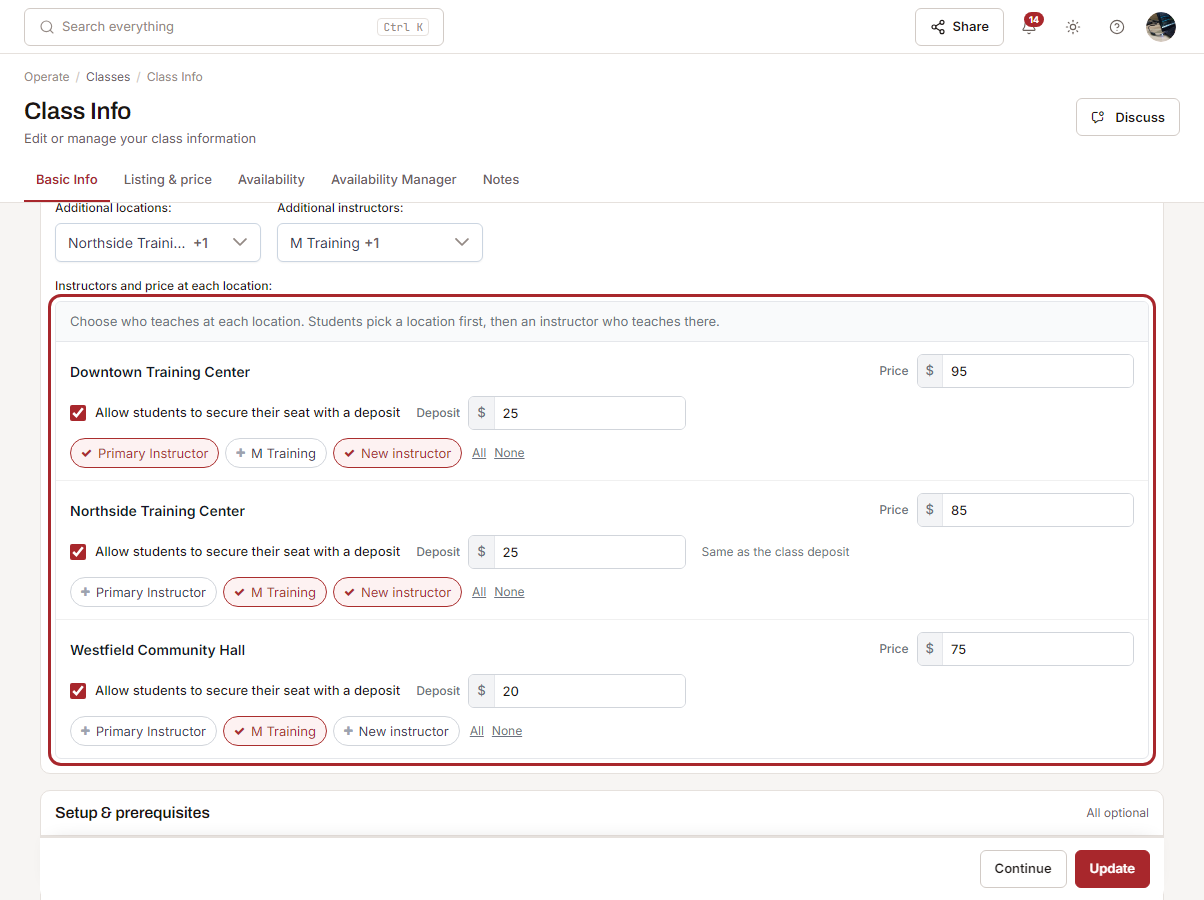
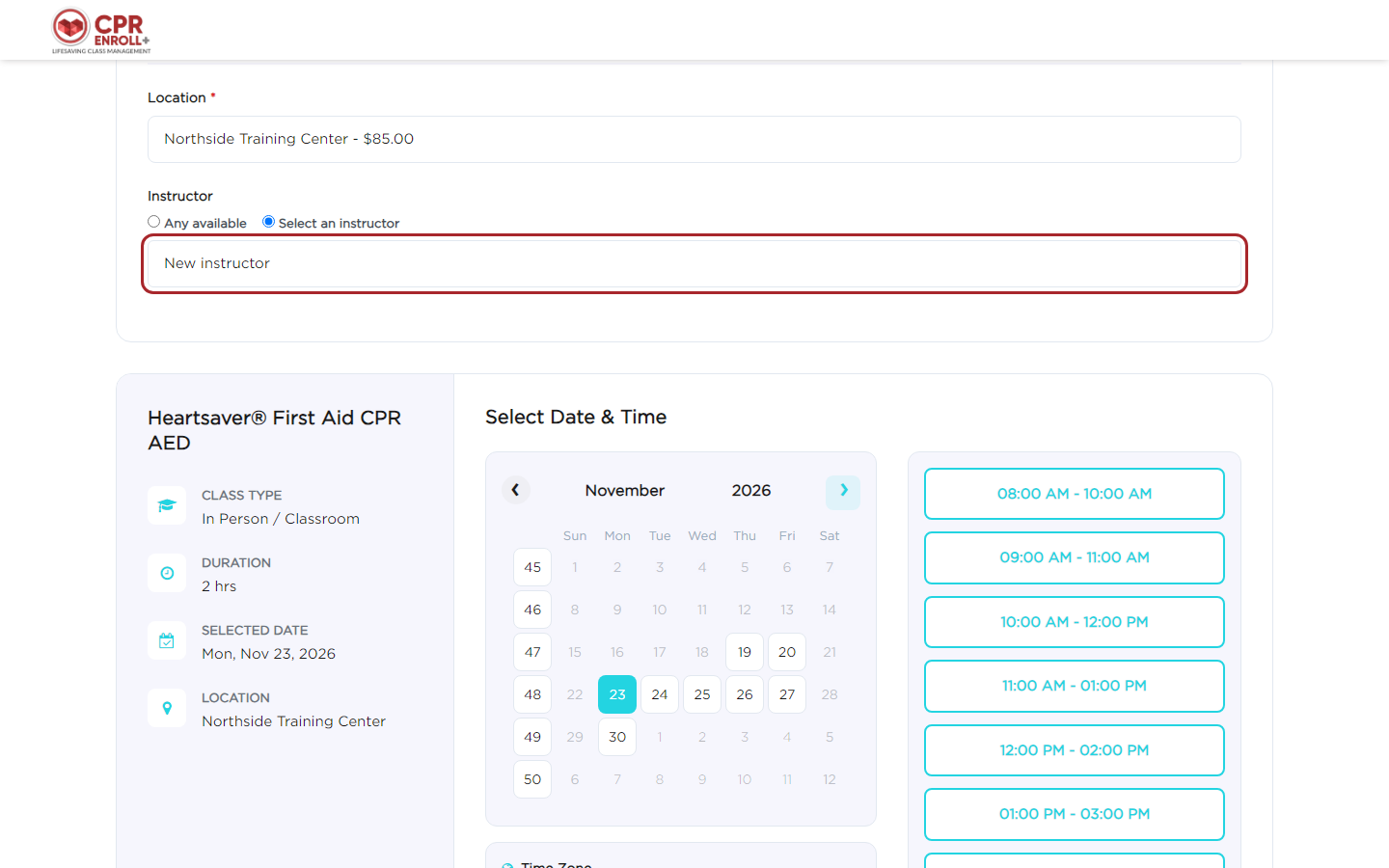
Read the full guide: Flexible classes: several locations and instructors.
Product catalog and new invoices
One product list now feeds both your store and your invoices, with product types, statuses, collections, cost and a tax code for each product. Archive a product and it leaves the store. Products can be tracked with stock at each location, and Admins get an email when stock runs low. Store sales and invoices take stock out, and a refund or a deleted invoice can put it back.
Invoices have a new page and a new Invoices settings tab: invoice numbering, PO numbers, payment terms, your branding on the PDF and email, and optional reminder emails for unpaid invoices. Tax can be worked out from each product's tax code. Each invoice's payment link now works only for that invoice. Your existing invoices, store orders and equipment rentals are unchanged, and invoices already sent keep the look they were sent with.
Two new permissions, Adjust stock and Invoice settings, let you choose who can change stock levels and invoice settings.
Where to find it: Payments › Catalog › Products, and Payments › Settings › Invoices
Needs attention on the Enrollments page
A new Needs attention tab collects the enrollments that need a follow-up: students who still owe money for a class that starts soon, waitlisted students whose class now has a free seat, and finished classes where students have no certificate yet.
Where to find it: Enrollments › Needs attention
Improved
Faster pages across the Portal
We worked on the pages you use most:
- Classes: the list, calendar and board load faster, and the class page saves with one click. Very busy calendar days show a total you can click to open the day.
- Enrollments: the page loads faster, and busy calendar days show a total too.
- People: the list and its counts load faster.
- Reports: reports open faster.
- Course Builder: pages and pop-ups open faster, the first visit downloads much less, and images save faster.
- Class Finder: search and class lists load faster for your students.
- Jobs: the Jobs page and posting a job are faster.
Clearer messages when a payment fails
When a payment doesn't go through, the student is now told whose problem it is (their bank, Afterpay, or us) and whether they were charged. A student whose Afterpay or Klarna payment was declined can pay again straight away. On Reports › Failed Enrollments, every action checks with Stripe first, so a payment can never be taken twice.
Class price 0.00 for client classes
A new setting sets the class price to 0.00 when you choose a client on a class, instead of the course price. The price stays editable, and a price you typed is never replaced. It is off until you turn it on.
Where to find it: Settings › Site Compliance › Class defaults
Flexible class bookings
Staff can move a flexible class booking to a custom date and time. A location deposit of 0 means no deposit at that location.
Rescheduling from the email link
The page a student opens from the reschedule email has a cleaner layout, and the confirmation email now shows the processing fee.
Jobs
Posting and finding instructor jobs is clearer, for the organizations that post them and the instructors who take them.
- Who sees a job: each job is Internal, My Network or Public, and only instructors that level allows can see it. Jobs you posted before keep who they were shown to, and applicants keep their access.
- Notifications: email and push alerts go only to instructors who can see the job and have Open to jobs turned on. You no longer get alerts for your own jobs.
- Distance filter and map: instructors can show jobs within 50 to 250 miles, or any distance. It starts at 100 and remembers their last choice. Distances follow your organization's miles or kilometers setting, in both the list and the map.
- Search and sorting: search by job name, applicant or awarded instructor, and sort by Pay, When or Job across every page.
- Payments: once the class has ended, record a payment with its method and reference, and it shows as Paid for both you and the awarded instructor. Instructors see only their own job payments.
- Posting, awarding, revoking, applying, bidding and withdrawing all work more smoothly.
Where to find it: Jobs
Fixed
- The card fields now load the first time the checkout page opens.
- An invoice saved as a draft and edited again shows your account's time zone.
- Cancel Class no longer shows on classes that are already cancelled in the calendar.
- After signing in as someone else on the same computer, the account menu no longer shows the previous person's organizations.
- A connected member organization can be picked in Instructor Group on the Instructors list.
- The number of mobile locations shows correctly on Class Info.
- A course's calendar colors always stay readable: Course Builder shows a preview, and a font color that can't be read on its background is switched to black or white.
- A new class now takes the course's Minimum Enrollment to Start Class setting.
- Clearing Close Registration Days on a class now uses the course's setting again.
- Opening a profile from Connections no longer shows "Profile Unavailable".
- The Contact Us list no longer scrolls inside itself.
- Equipment no longer appears as invoice items in the catalog's Invoice Items list.
- Archived instructors are no longer offered in Pricing Profiles, Expenses and Equipment.
- Equipment now shows the class date and time.
- Paperwork submitted to a connected organization now includes its PDF files, and deleted classes no longer appear in the Paperwork Inbox.
- The Discuss button no longer shows on an enrollment opened from the calendar.
- Job removal emails now include the reason the job was removed.
- Instructors can leave feedback on a job after the admin's review is done.
Was this article helpful?
Related articles
- Release notes - 6 November 2026Class paperwork in five clear steps with one button to submit for approval, per-student forms you can generate and send, and Agency Connect end to end for HSI, Red Cross and AHA.Release notes
- Release notes - 30 October 2026Smart Paperwork class packets, fillable custom forms, online class evaluations, rental equipment in the Store, payment links, blackout dates, plan information in the Portal, UK and Mexico support and a new cprenroll.com.Release notes