
You can embed CPR Enroll+ registration directly into your website so students browse classes and sign up without ever leaving your site. You choose which registration page to embed, then choose how it loads.
Accessing the Embed Code
- Click your username at the bottom of the left sidebar.
- Select Share Registration.
- Under Registration page, choose the page you want to embed — all classes, all classes plus group training, a group training inquiry form, a kiosk page, a single class type, a single course, or a private client page.
- Click the Embed Code tab.
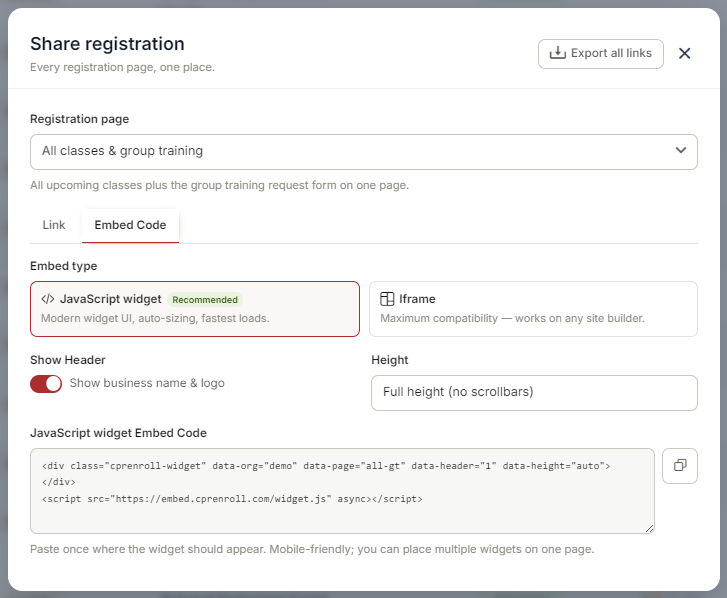
✔ Each registration page has its own embed code. If you change the Registration page selection, copy the code again — the previous code still points at the previous page.
Choosing an Embed Type
- JavaScript widget (recommended) — modern widget UI, auto-sizing, fastest loads. Use this unless your site builder strips script tags.
- Iframe — maximum compatibility; works on any site builder.
Two options apply to either type:
- Show Header — displays your business name and logo above the listings. Turn it off if your page already shows your branding.
- Height — Full height (no scrollbars) lets the widget grow to fit its content, so your page scrolls instead of the widget.
Adding the Embed to Your Website
- Copy the code — click the copy icon next to the embed code.
- Paste it into your website where you want the registration to appear.
- Publish and preview the page to confirm the widget loads and classes are listed.
Best Practices
- Embed the page that matches the section of your site. A course-specific page on a course landing page converts better than your full catalog.
- Both embed types are mobile-responsive and adjust to the container width.
- You can place more than one widget on the same page — for example, one course in one section and another further down. Paste each page's own code where you want it.
- Test on a phone as well as a desktop browser.
✔ Embedding a private client page? Its link and embed code carry an access key. If you regenerate that key, every previously shared link and embed stops working — including this one — so re-copy the code afterward.
Was this article helpful?
That’s Great!
Thank you for your feedback
Sorry! We couldn't be helpful
Thank you for your feedback
Feedback sent
We appreciate your effort and will try to fix the article