
The Launchpad is the first screen you see when you log in to CPR Enroll+. It is designed as a quick-access hub — every major action you need to run your training business is one click away. This guide walks through each of the Launchpad cards in the recommended setup order.
ℹ Why order matters — each step in the setup sequence builds on the previous one. You need a Location and a Course before you can create a Class. You need a Class before you can share a registration link. Follow the order below to avoid “missing dependency” errors.
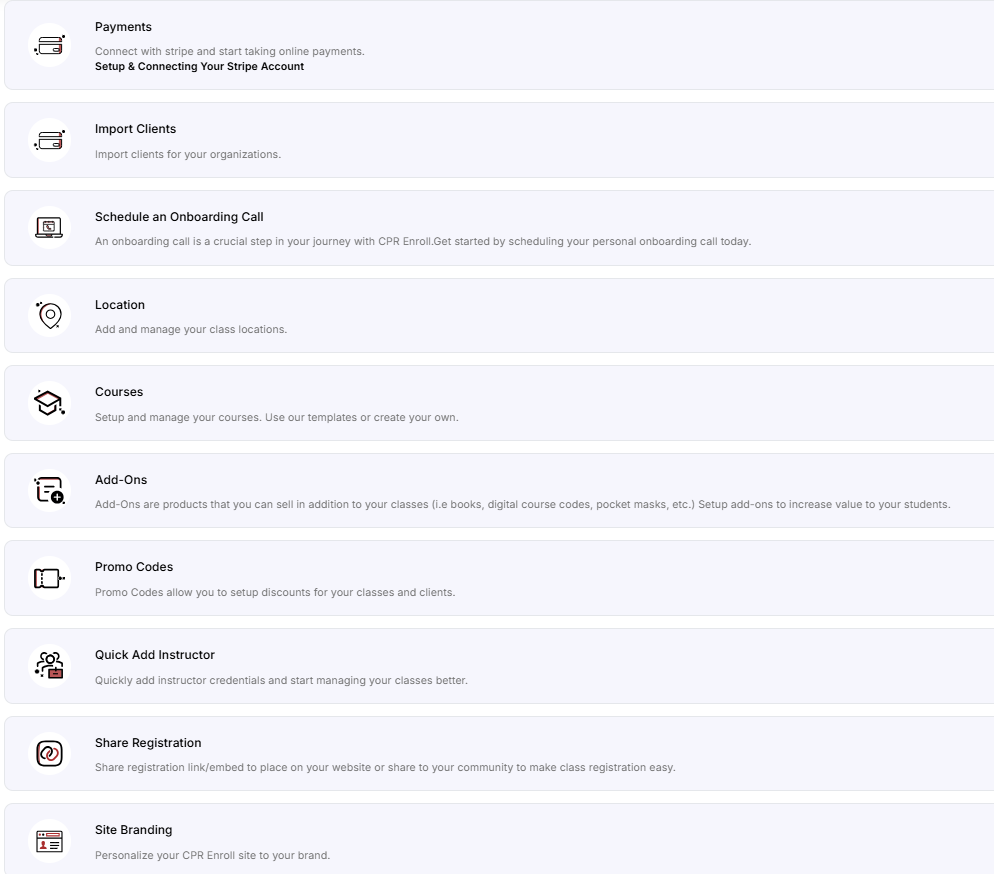
Card 1 — Payments → Connect
Connecting Stripe is one of the most important early steps. It lets you accept credit cards and digital wallets directly from your registration page, and enables automated payouts to your account.
Click Connect on the Payments card.
Click Connect with Stripe and follow the Stripe onboarding flow.
ℹ This step must be completed by the business owner or someone with significant management responsibility.

Card 2 — Import Clients → Import
If you work with corporate clients or organizations who send groups of employees to your classes, you can import their company records here.
Click Import on the Import Clients card.
Follow the import prompts to upload your client list.
ℹ This step is optional for independent instructors who work primarily with individual students.
Card 3 — Schedule an Onboarding Call → Schedule
CPR Enroll+ offers a free one-on-one onboarding call for new account holders. A team member will walk through your specific setup and answer your questions live.
Click Schedule on the Schedule an Onboarding Call card.
Choose a date and time from the available slots and confirm your booking.
ℹ Highly recommended for first-time users. See the Schedule an Onboarding Call article for what to prepare.
Card 4 — Location → Manage
Locations define where your classes take place — a physical address or a virtual meeting link.
Click Manage on the Location card.
Click + and choose Physical or Virtual.
For physical: type the address in the Address field and select from the Google Maps autocomplete suggestions.
For virtual: enter the meeting URL (Zoom, Teams, etc.).
Set the Primary Time zone and click Save.

Card 5 — Courses → Manage
Courses are the blueprints for every class you schedule. Each course defines the name, price, expiration years, certification body, and all student-facing content.
Click Manage on the Courses card.
Click + and enter a Course Name and Expiration Years (minimum required fields).
Add a price, discipline, association, and description.
✔ Shortcut: import a pre-built template from the Marketplace (sidebar) to auto-fill all fields from an AHA, ARC, or HSI course template.

Card 6 — Add-Ons → Manage
Add-ons are supplementary products students can purchase with their enrollment — textbooks, pocket masks, digital access codes, and more.
Click Manage on the Add-Ons card.
Click + and choose the type: Shippable, Non-shippable, or Keycode.
Set a name, price, and description. Toggle Default selection to pre-select it during checkout.
Card 7 — Promo Codes → Manage
Create discount codes for students to apply at checkout — flat dollar or percentage discounts, with optional date limits and usage caps.
Click Manage on the Promo Codes card.
Click +, enter the code text, discount type (flat or percentage), and value.
Set start/end dates and a usage limit if needed, then click Save.
Card 8 — Quick Add Instructor → Add
Instructors must be in the system before you can assign them to a class.
Click Add on the Quick Add Instructor card.
Enter First Name, Last Name, and Email Address (required fields).
Optionally toggle Create User Account to give the instructor login access to the dashboard.
Click Save. The instructor now appears in the Instructor dropdown when creating classes.
✔ Full instructor setup — for instructor certifications, portal access, and email signatures, go to People > Instructors and use the full edit form.

Card 9 — Share Registration → Share
This makes your training business visible to prospective students.
Click Share on the Share Registration card.
The Share Registration modal opens. Copy the Layout Based View link and share it via email, social media, or your website.
Students visit this link to browse your classes and self-enroll.
See the Understanding Share Registration article for all link types and embed code options.
Card 10 — Site Branding → Configure
Upload your logo, set your brand color, and add contact details. Your branding appears on all student-facing pages at classes.cprenroll.com.
Click Configure on the Site Branding card.
Upload your Header Logo and Footer Logo.
Set your brand color in Color Config.
Add your social media links and contact details.
Click Save.

Quick-Reference Setup Table
Was this article helpful?
That’s Great!
Thank you for your feedback
Sorry! We couldn't be helpful
Thank you for your feedback
Feedback sent
We appreciate your effort and will try to fix the article