Agency Connect posts your classes and issues certificates on certification-body websites, using a Chrome extension that fills the forms for you. You stay in control — Agency Connect never clicks a paid or final button. Submit is always yours.
Before You Begin
- Agency Connect sits under Operate in the left navigation, with three tabs: Console, Vouchers & Codes and Course Mapping.
- You need the Agency Connect Chrome extension paired on the computer you are working from.
- The certification body must be switched on and the course mapped before a run can start.
Runs Start From a Class, Not From This Page
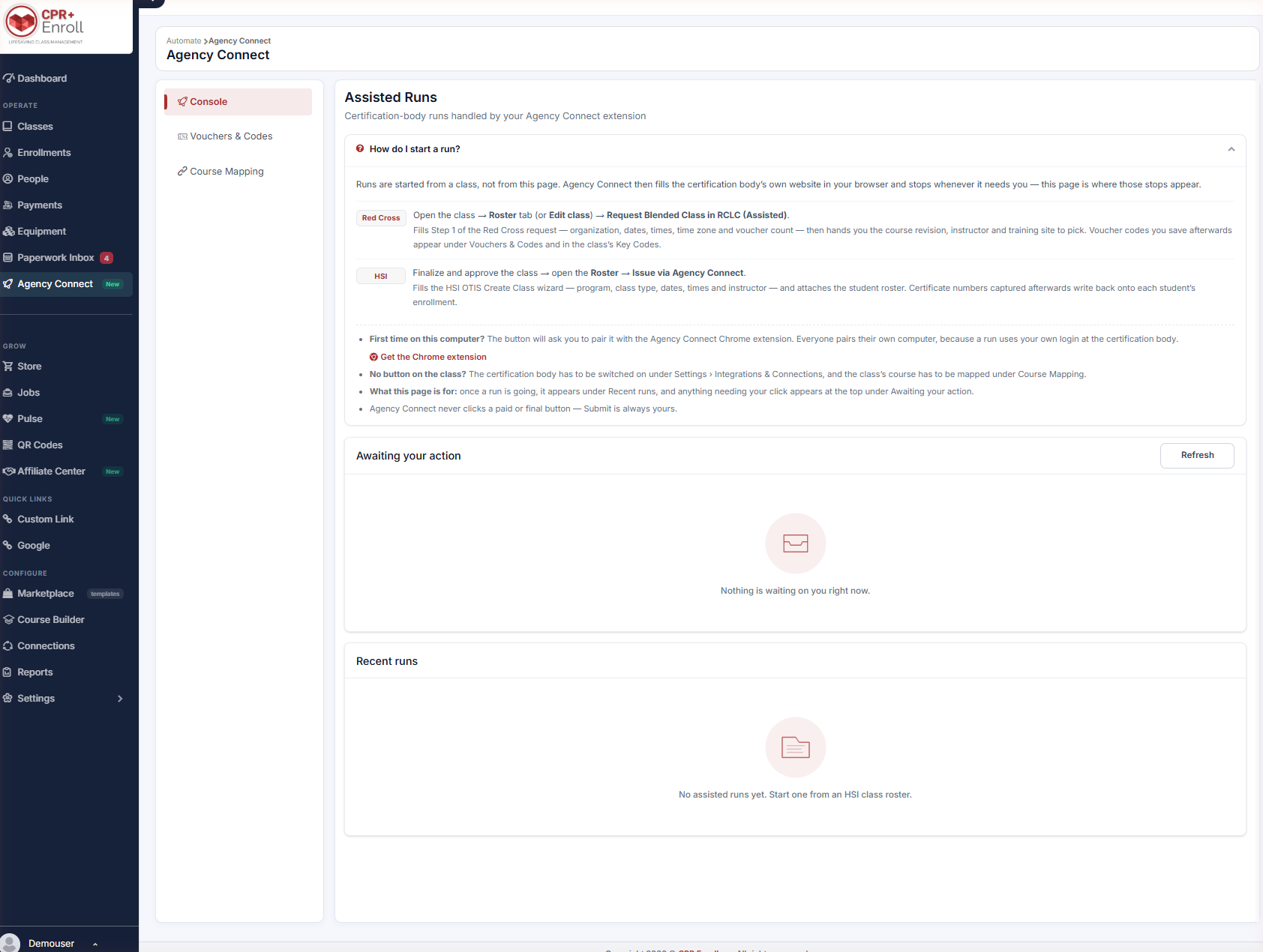
This is the single most common point of confusion. The Console says so directly: “Runs are started from a class, not from this page. Agency Connect then fills the certification body’s own website in your browser and stops whenever it needs you — this page is where those stops appear.”
✔ The Console is a waiting room, not a launcher. If you are looking for a Start button here, you are in the wrong place — go to the class.
Starting a Red Cross Run
- Open the class and go to the Roster tab (or Edit class).
- Click Request Blended Class in RCLC (Assisted).
This fills Step 1 of the Red Cross request — organization, dates, times, time zone and voucher count — then hands you the course revision, instructor and training site to pick. Voucher codes you save afterwards appear under Vouchers & Codes and in the class’s Key Codes.
Starting an HSI Run
- Finalize and approve the class.
- Open the Roster.
- Click Issue via Agency Connect.
This fills the HSI OTIS Create Class wizard — program, class type, dates, times and instructor — and attaches the student roster. Certificate numbers captured afterwards write back onto each student’s enrollment.
✔ Where to find the button. Both entry points live on the class’s Roster tab, in the action row above the student list — Request Blended Class in RCLC (Assisted) for Red Cross, and Issue via Agency Connect for HSI. The Red Cross action is also available from Edit class. If you do not see either one, read No Button on the Class? below before assuming something is broken.
First Time on This Computer
The button will ask you to pair with the Agency Connect Chrome extension. Everyone pairs their own computer, because a run uses your login at the certification body. Use the Get the Chrome extension link on the Console, then pair with the one-time code.
No Button on the Class?
Two things must both be true:
- The certification body is switched on under Settings > Integrations & Connections.
- The class’s course is mapped under Course Mapping.
Reading the Console
| Panel | What it shows |
|---|---|
| Awaiting your action | Anything that needs your click. Use Refresh to update. |
| Recent runs | Runs in progress and completed. |
Best Practices
- Keep the Console open in a tab while a run is going. That is where it tells you it needs you.
- Pair every machine anyone will run from, including laptops. Pairing is per person, per computer.
- If the action button is missing, check the two conditions above before contacting support — it is almost always one of them.
- Never walk away mid-run expecting it to finish. By design it stops and waits for you at every consequential step.
Frequently Asked Questions
| Question | Answer |
|---|---|
| Where do I start a run? | From the class — its Roster tab or Edit class — not from the Agency Connect page. |
| Will it submit anything on my behalf? | No. Agency Connect never clicks a paid or final button. Submit is always yours. |
| Do my colleagues need to pair too? | Yes. Runs use each person’s own login at the certification body, so everyone pairs their own computer. |
| Why is there no Agency Connect button on my class? | Either the certification body is switched off, or the course is not mapped. |
| Where do Red Cross voucher codes end up? | Under Vouchers & Codes and in the class’s Key Codes. |
✔ You know how runs work. Next, read Setting Up Agency Connect for HSI and American Red Cross.
Was this article helpful?
That’s Great!
Thank you for your feedback
Sorry! We couldn't be helpful
Thank you for your feedback
Feedback sent
We appreciate your effort and will try to fix the article