Automate Marketing Audit Reports in Workflows
Automating marketing audit reports lets you instantly generate insights for your prospects and deliver them through personalized outreach. By using workflow automation and custom values, you can automatically include audit report links and business-specific details in your emails or SMS messages. This removes manual steps and helps you scale lead engagement efficiently.
Whether you’re nurturing new leads or running outbound campaigns, this setup improves both speed and personalization.
TABLE OF CONTENTS
- What is Marketing Audit Report Automation in Workflows?
- Key Benefits of Marketing Audit Report Automation
- Generate Marketing Audit Report Action
- Custom Values for Audit Reports
- Using Audit Reports in Email and SMS
- How to Set Up Marketing Audit Report Automation
- Frequently Asked Questions
What is Marketing Audit Report Automation in Workflows?
Marketing Audit Report Automation in workflows enables you to automatically generate a detailed audit report for a prospect and use that report within your workflow-driven communications. This connects lead capture, analysis, and outreach into a streamlined process so you can deliver immediate value without manual work.
When the Generate Marketing Audit Report action is added to a workflow, the system creates a report for the prospect and generates dynamic custom values. These values—such as the audit report link and the prospect’s business name—can then be inserted into later steps like emails or SMS messages for personalized communication.
Key Benefits of Marketing Audit Report Automation
Automating audit reports within workflows helps you deliver faster, more personalized outreach while reducing manual work and improving scalability.
- End-to-End Automation: Automatically move from lead capture to audit generation to outreach without manual steps
- Personalized Messaging: Use dynamic data like business name and report links to tailor communication
- Faster Response Time: Instantly deliver value to new leads, improving engagement rates
- Scalable Outreach: Handle large volumes of prospects without extra effort
- Improved Lead Conversion: Provide actionable insights upfront to build trust and credibility
Generate Marketing Audit Report Action
The Generate Marketing Audit Report action powers this feature. It enables workflows to automatically create a marketing audit report for each prospect, making the data available for use in later workflow steps.
- Generates a unique audit report per contact
- Works with leads from forms, ads, imports, or other workflow triggers
- Outputs dynamic custom values for use later in the workflow
Custom Values for Audit Reports
Custom values created by the audit report action let you personalize outreach automatically. These values populate once the audit report is created, so your messages can include accurate, prospect-specific details.
Available Custom Values
- Prospect Web Report Link: A direct link to the generated audit report
- Prospect Business Name: The name of the prospect’s business for personalization
You can insert these values into email or SMS steps in the same workflow.
Using Audit Reports in Email and SMS
Adding audit report data to your messaging creates personalized, value-driven communication and helps prospects see immediate, actionable insights about their business.
Example Email
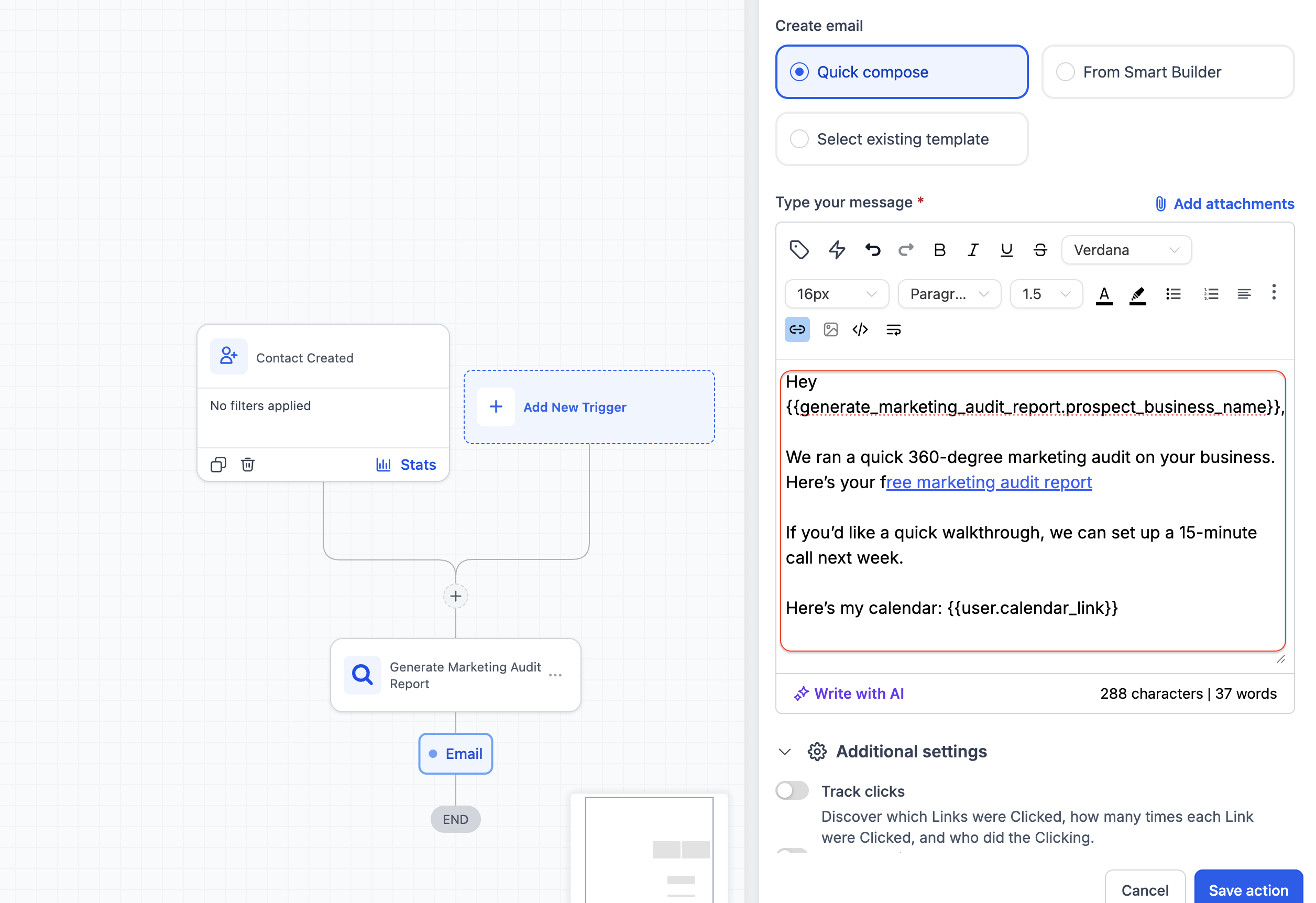
Hi {{prospect_business_name}},
We’ve created a marketing audit for your business. You can view it here:
{{prospect_web_report_link}}
Example SMS
Hi {{prospect_business_name}}, check out your audit: {{prospect_web_report_link}}
How to Set Up Marketing Audit Report Automation
Following the correct sequence ensures the audit report is generated before you reference its custom values in messages.
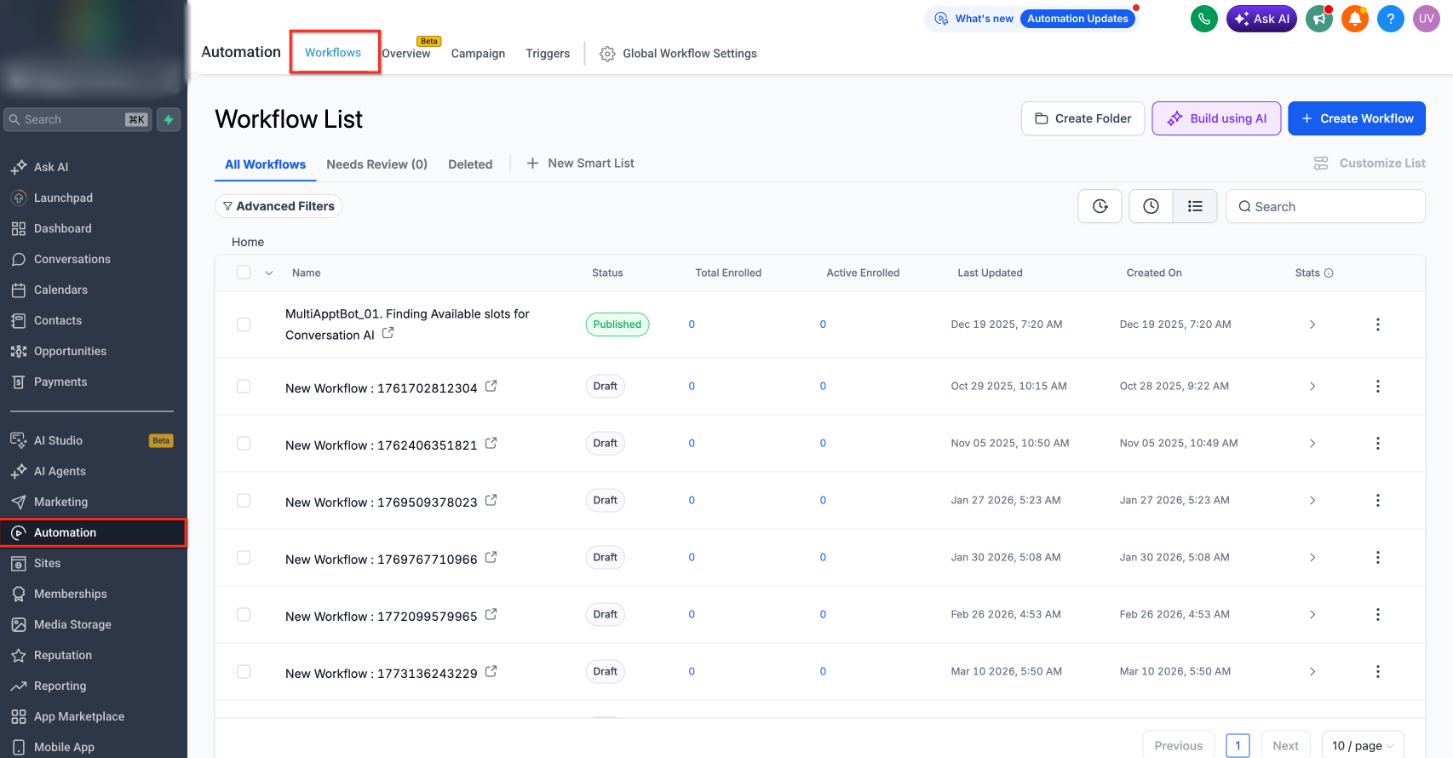
- Go to Automation → Workflows
- Create a new workflow or open an existing one
- Add a trigger (for example: form submission, new lead, or import)
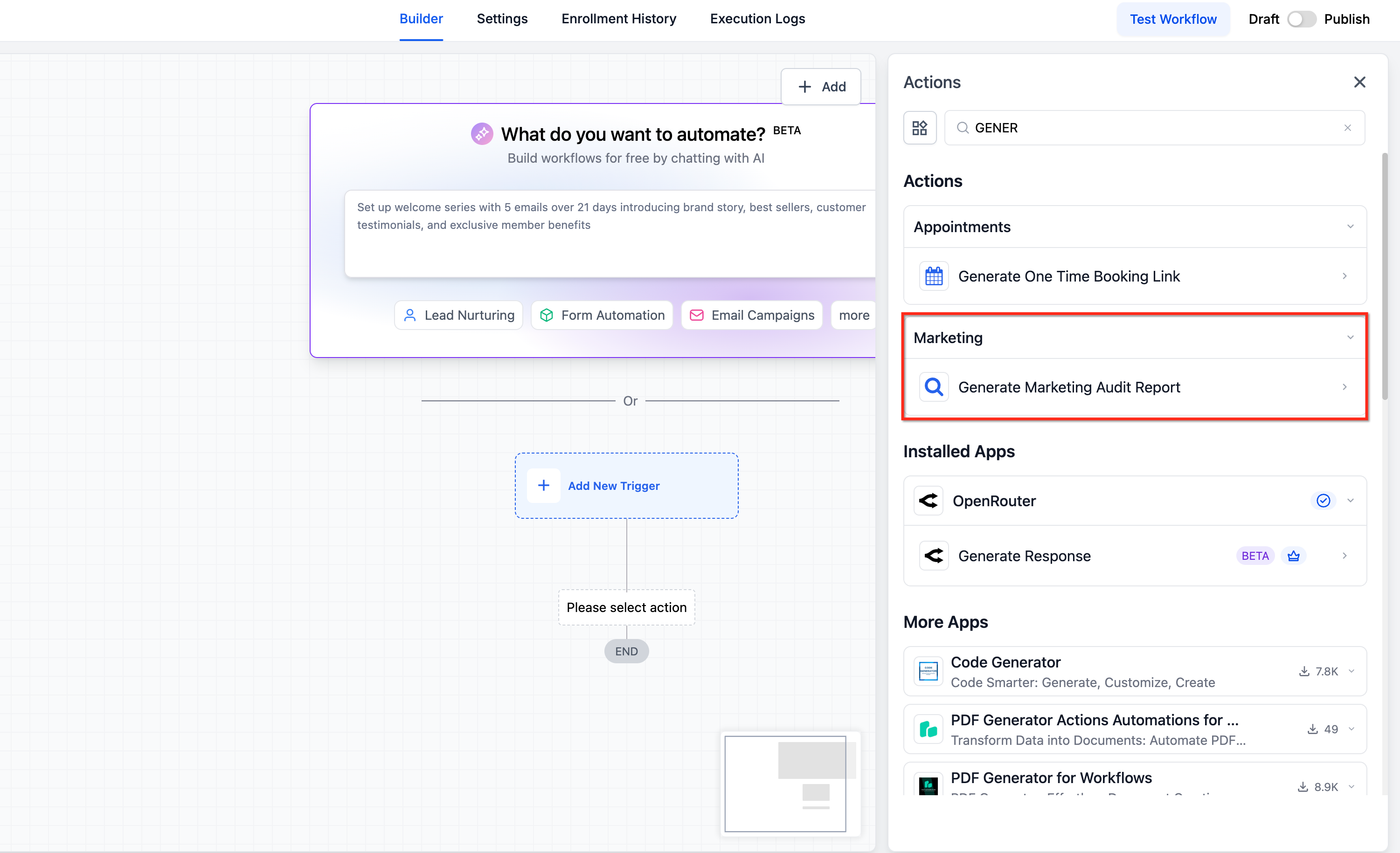
- Click + Add Action and select Generate Marketing Audit Report
- Add a follow-up action such as Send Email or Send SMS
- In the message editor, insert:
- Prospect Web Report Link
- Prospect Business Name
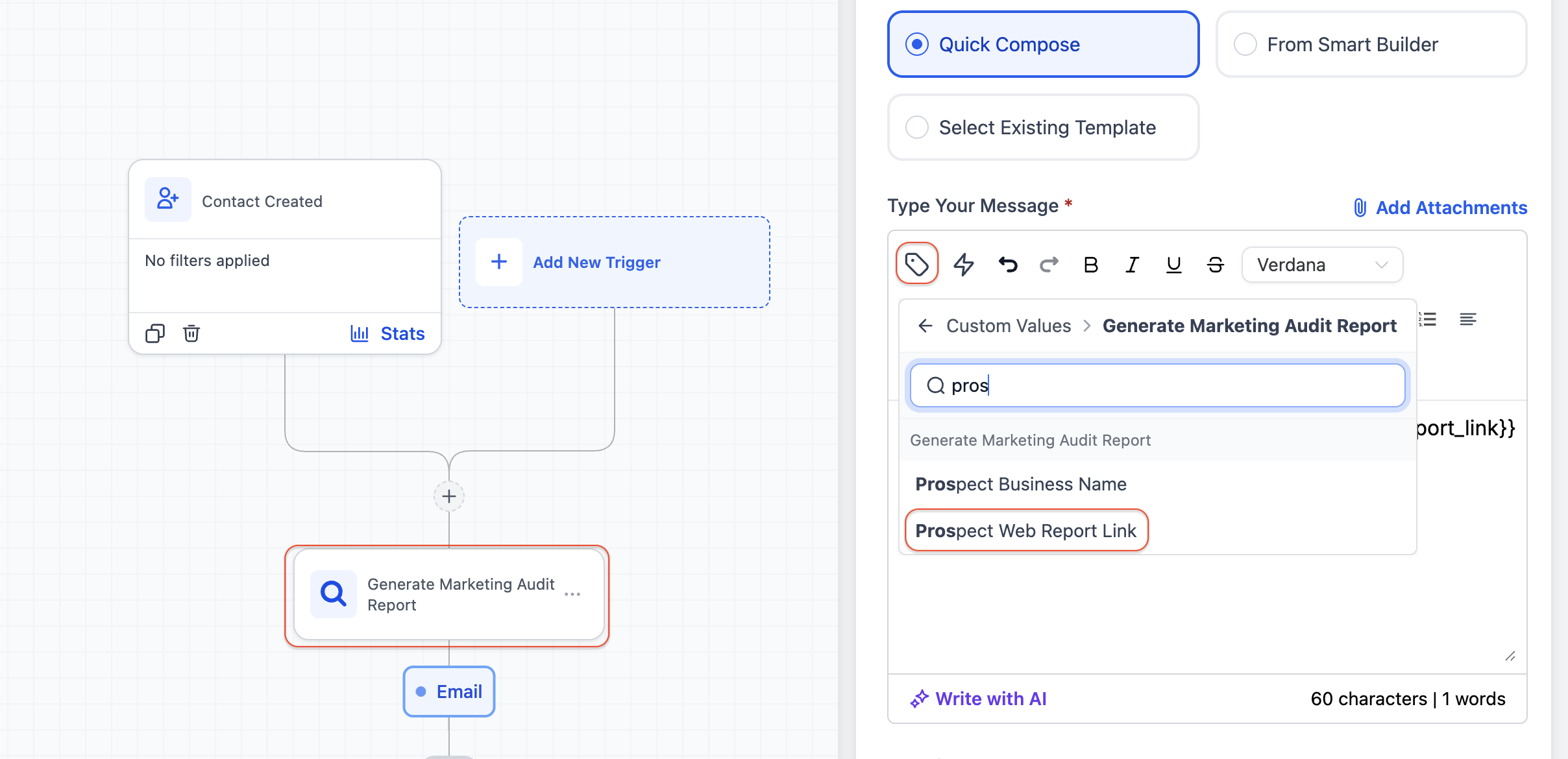
- Prospect Web Report Link
- Customize your message content as needed
- Save and publish the workflow
Frequently Asked Questions
Q1: When are the custom values populated?
A: The custom values are generated immediately after the Generate Marketing Audit Report action runs in the workflow.
Q2: Can I use these custom values outside workflows?
A: These values are generated within workflows, so they are primarily intended for use in later workflow steps.
Q3: What happens if I add the email step before the audit action?
A: The custom values won’t be available. Make sure the audit report action comes before any messaging steps.
Q4: Can I use this feature for leads from any source?
A: Yes. It works with leads from forms, ads, imports, and other workflow triggers.
Q5: Is the audit report link unique for each prospect?
A: Yes. Each generated report link is unique to the individual prospect.
Q6: Can I customize the audit report content?
A: Customization options depend on your Marketing Audit Report settings.
Was this article helpful?
Related articles
- Set Event Start Date Event In WorkflowsIn this guide, we'll explore the "Set Event Start Date" Workflow Action, a dynamic tool that allows you to schedule tasks and reminders within your workflow for precise event management. This feature is crucial for maintaining well-organized webinars, conferences, or personalized notification systemWorkflow
- How to use the Inbound Webhook Workflow Premium Trigger?Inbound Webhooks enable seamless CRM integration by allowing external systems to automatically send data using various HTTP request methods like GET, POST, and PUT. This real-time data transfer capability enhances CRM functionality and streamlines workflows, facilitating efficient communication and Workflow
- How to use the Custom Webhook LC Premium Workflow Action?The Custom Webhook - LC Premium Action is a feature enabling real-time data exchange between your CRM and third-party services. It allows tailored requests with various HTTP methods, authorization, headers, and query parameters. This user-friendly tool ensures efficient and accurate workflows while Workflow
- How to use the Workflow Slack Premium Action?Workflow Slack Premium Action is a feature that enables users to send automated messages to Slack channels and users, streamlining communication and improving team collaboration. The action offers three main events: sending a message to a user, a private channel, or a public channel. Covered in thWorkflow