Teaching Assistants (Assistants) in CPR Enroll+ are additional instructors who help deliver a class alongside the primary instructor. They appear on the class record and can be used to filter the class list — but they are distinct from the lead instructor, who holds primary responsibility for the class and its paperwork.
Before You Begin
- Make sure each person you want to add as an assistant already exists in your system under People > Instructors.
- Know which class or classes you want to assign assistants to.
Step-by-Step Instructions
Step 1: Add an Assistant to a Class
- Go to Classes and click + to create a new class, or ⋮ > Edit on an existing class.
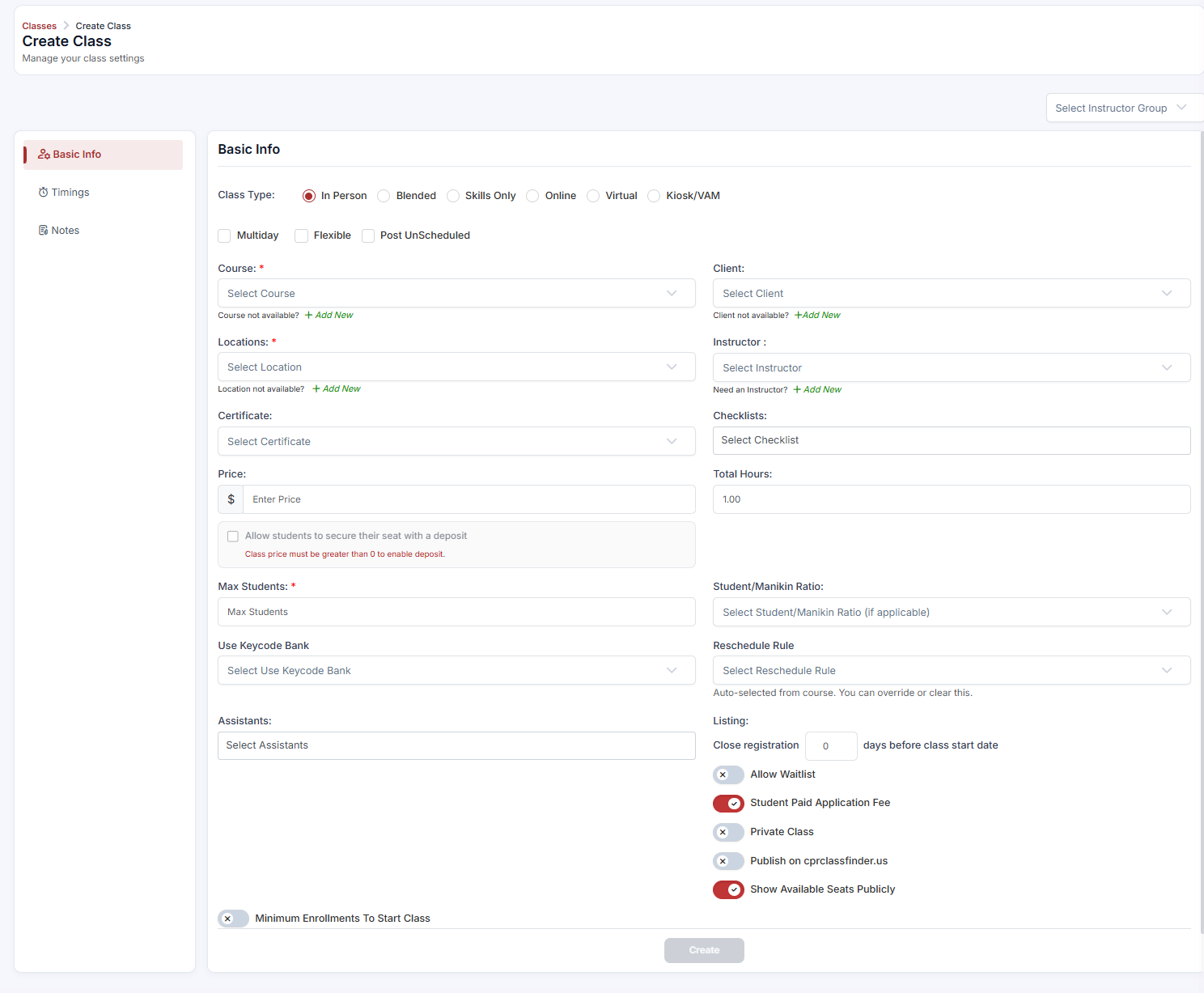
- In the class form, find the Assistants field — a multi-select dropdown, separate from the primary Instructor field.
- Type the name of the instructor you want to add as an assistant. They must already exist in your system (People > Instructors).
- Select one or more assistants from the dropdown. There is no maximum limit.
- Click Save.
Step 2: View and Filter by Assistant
- Go to Classes in the sidebar. The list has an Assistants column showing the assistants assigned to each class.
- Use the Filters panel or the column filter on the Assistants column to filter by a specific instructor's name.
- The list will show only classes where that instructor is assigned as an assistant.
✔ Large classes and skills stations. Assistants are particularly useful for large BLS or Heartsaver classes where multiple skills stations run simultaneously. Assign one lead instructor and multiple assistants to accurately reflect who was present.
Assistant vs. Instructor — Key Differences
| Primary Instructor | Assistant | |
|---|---|---|
| Appears on class record | Yes | Yes |
| Appears on student confirmation email | Typically yes | No (by default) |
| Responsible for class paperwork | Yes | No |
| Counts toward class capacity supervision | Yes | Supplementary |
| Can be filtered in class list | Yes | Yes |
Best Practices
- Keep one clear lead instructor per class — they carry responsibility for paperwork and are the one students see in their confirmation email.
- Add assistants for any class running multiple simultaneous skills stations, so attendance records reflect everyone who was present.
- Use the Assistants column filter to quickly pull up every class a given instructor has supported.
- Make sure an instructor exists under People > Instructors before trying to add them as an assistant.
Frequently Asked Questions
| Question | Answer |
|---|---|
| Is there a limit to how many assistants I can add to a class? | No, there is no maximum limit on the number of assistants you can assign. |
| Do assistants receive the same confirmation email as the primary instructor? | No. By default, assistants do not appear on the student confirmation email; only the primary instructor typically does. |
| Who is responsible for class paperwork — the instructor or the assistant? | The primary instructor holds responsibility for class paperwork; assistants do not. |
✔ You're all set. Your assistants are assigned, and your class records now accurately reflect everyone who helped deliver the class.
Was this article helpful?
That’s Great!
Thank you for your feedback
Sorry! We couldn't be helpful
Thank you for your feedback
Feedback sent
We appreciate your effort and will try to fix the article