
CPR Enroll does not decide who may teach a class by matching certification names letter for letter. It uses rules-based teaching authorizations — a matrix maintained by the platform that says which instructor credential permits which course. This is what decides whether a class can be finalized.
Before You Begin
- Teaching Authorizations live under Settings → Teaching Authorizations. Access follows your role.
- Every certification record on an instructor carries a Card Type — Instructor or Provider. Only Instructor credentials count toward teaching authorization.
- Have a class in mind that is failing to finalize, if you are here to troubleshoot — the reason is almost always a missing or expired Instructor-type credential.
✔ The one rule to remember. The banner at the top of the page says it: your training center can remove authorizations that the platform grants, but can never add ones it doesn’t. You can restrict what your instructors are allowed to teach — you cannot widen it beyond what the certifying bodies permit.
Step 1: Open the Authorization Matrix
- Go to Settings → Teaching Authorizations.
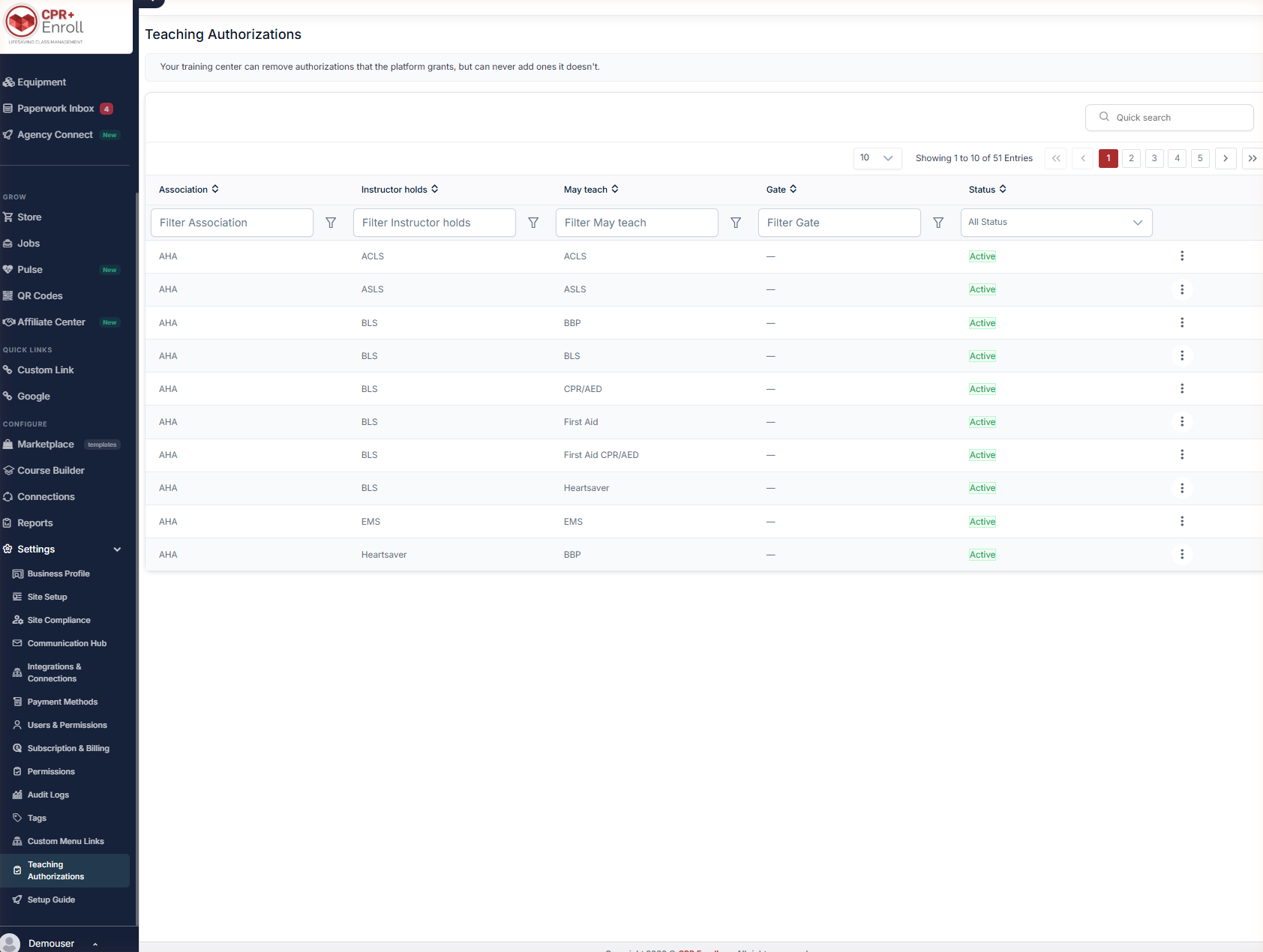
- The page opens on the matrix: one row per authorization rule.
- Use Quick search and the column filters to find a specific rule.
Step 2: Read a Row
Each row is a single rule, and the columns tell you the whole story:
| Column | Contents |
|---|---|
| Association | The certifying body — AHA, Red Cross, HSI or NSC. |
| Instructor holds | The instructor credential the rule applies to. |
| May teach | The course or courses that credential authorizes. |
| Gate | The condition that must be met. |
| Status | Whether the rule is Active for your organization. |
A worked example: AHA · BLS · may teach · First Aid CPR/AED · Active. An instructor holding a current AHA BLS Instructor card is authorized to teach your First Aid CPR/AED course.
Step 3: Understand Card Type — Instructor vs. Provider
This is the single most common source of confusion. Each certification record is marked Instructor or Provider.
- Instructor cards authorize teaching and are evaluated against the matrix.
- Provider cards do not. A BLS Provider card does not authorize anyone to teach BLS, no matter how current it is.
✔ Class won’t finalize? Check the Card Type on the instructor’s certification record first. A Provider card entered where an Instructor card belongs will block finalization every time.
Step 4: Know How Authorization Is Evaluated
- Authorization is checked using the certification that was valid on the class date — not today’s date.
- Where an instructor holds several qualifying credentials, the best matching one is selected automatically.
- If no valid instructor certification is found, class finalization is blocked with a clear explanation of what is missing.
- The credential actually used is saved permanently with the class, so later renewals or changes never rewrite a historical roster.
That last point matters for audits: a roster finalized in March still shows the credential that was valid in March, even after the instructor renews in June.
Step 5: Restrict an Authorization
- Find the rule using Quick search or the column filters.
- Open the action menu (⋮) on the row.
- Choose to disable the authorization for your organization.
Disabling narrows what your instructors may teach. There is no corresponding way to add an authorization the platform has not granted.
Step 6: Don't Confuse This With Instructor Access
The Instructor Access section on the course form is a separate control: “Restrict which instructors can access this course. Leave empty to allow all instructors.” It shows how many instructors are hidden because they are not authorized.
| Control | Question it answers | Who sets it |
|---|---|---|
| Teaching Authorizations | Who may teach this, per the certifying bodies? | The platform grants; you may only remove. |
| Instructor Access | Who do we want teaching this course? | You, per course. |
The two work together. Teaching Authorizations decide who may teach; Instructor Access decides who you want to teach.
Best Practices
- Audit Card Type on every instructor record before your first class of a new course — not on finalization day.
- Use Instructor Access for business rules (seniority, region, specialty) and leave Teaching Authorizations alone unless you have a compliance reason to restrict.
- When an instructor’s credential is about to expire, check which classes they are assigned to after the expiry date — those will block at finalization.
- Keep the matrix as the source of truth in disputes. It shows exactly which rule applied and why.
Frequently Asked Questions
| Question | Answer |
|---|---|
| Can I add a teaching authorization my organization needs? | No. Your training center can remove authorizations the platform grants, but can never add ones it doesn’t. |
| Why is my instructor blocked when their card is current? | Most often the record is a Provider card, not an Instructor card. Only Instructor credentials count. |
| My instructor renewed — will old rosters change? | No. The credential used is saved permanently with the class, so historical rosters are never rewritten. |
| What if an instructor holds several qualifying credentials? | The best matching one is selected automatically. |
| Is authorization checked against today’s date? | No — against the certification that was valid on the class date. |
| What’s the difference between this and Instructor Access? | Teaching Authorizations decide who may teach. Instructor Access, set per course, decides who you want to teach. |
✔ You’re all set. With Card Types correct and the matrix understood, class finalization should stop surprising you.
Was this article helpful?
That’s Great!
Thank you for your feedback
Sorry! We couldn't be helpful
Thank you for your feedback
Feedback sent
We appreciate your effort and will try to fix the article