The Dropped Students report shows every student who was removed or dropped from a class in CPR Enroll+. Monitoring this report helps you identify patterns, understand why students are not completing classes, and create re-engagement opportunities to bring them back.
Accessing the Report
From the sidebar, go to Reports > Dropped Students.
The report loads with all dropped enrollments, most recent first.
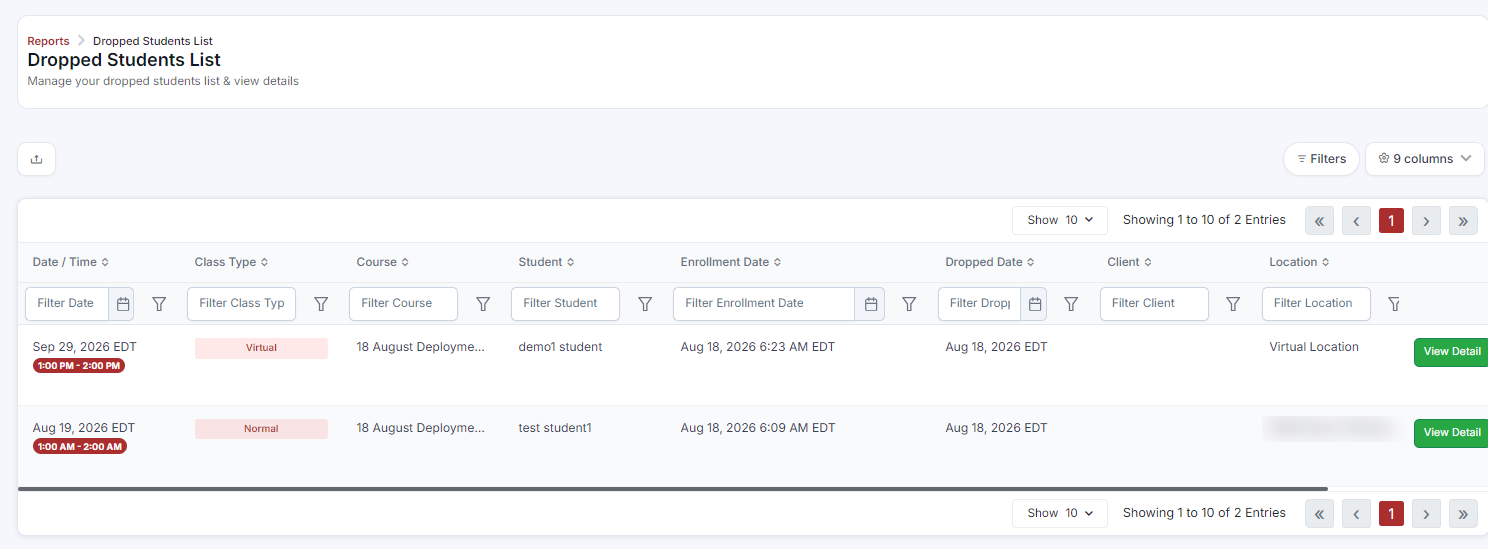
Understanding the Report Columns
Student Name — the student who was dropped
Email — for follow-up contact
Course — the course they were enrolled in
Class — the specific session they were removed from
Drop Date — when they were removed
Instructor — the instructor assigned to the class
Filtering and Exporting
Click Filters to narrow the report by date range, instructor, course, or location.
Use the Search field to find a specific student by name or email.
Click Export to download the full report as a spreadsheet for analysis.
Why Students Appear in This Report
An admin manually dropped them (Enrollments > Drop student)
The class was canceled — all enrolled students are automatically moved to dropped status
A student requested a cancellation and it was processed
Duplicate import enrollments were cleaned up
Re-Engaging Dropped Students
Export the list and use the email addresses to send rescheduling options or a special offer.
Create a coupon for dropped students — set it to apply to all courses and share it in an email campaign. See Instructor Store Coupons (Promo Codes) for setup.
Look for patterns — if the same course or class type has consistently high drop rates, it may signal a scheduling, pricing, or communication issue.
Was this article helpful?
That’s Great!
Thank you for your feedback
Sorry! We couldn't be helpful
Thank you for your feedback
Feedback sent
We appreciate your effort and will try to fix the article