How to Add or Update an SOP or Checklist
Checklists in CPR Enroll+ are structured step-by-step guides — Standard Operating Procedures — that instructors follow during a class. They ensure consistent delivery across all instructors and sessions, and can cover skills testing protocols, equipment setup, or any other procedural requirement. Completed checklists are saved with the class record for compliance.
Before You Begin
- Outline the steps or tasks your checklist needs to cover, and note which ones are mandatory versus optional.
- Decide which courses this checklist should apply to.
Step-by-Step Instructions
Step 1: Create a Checklist
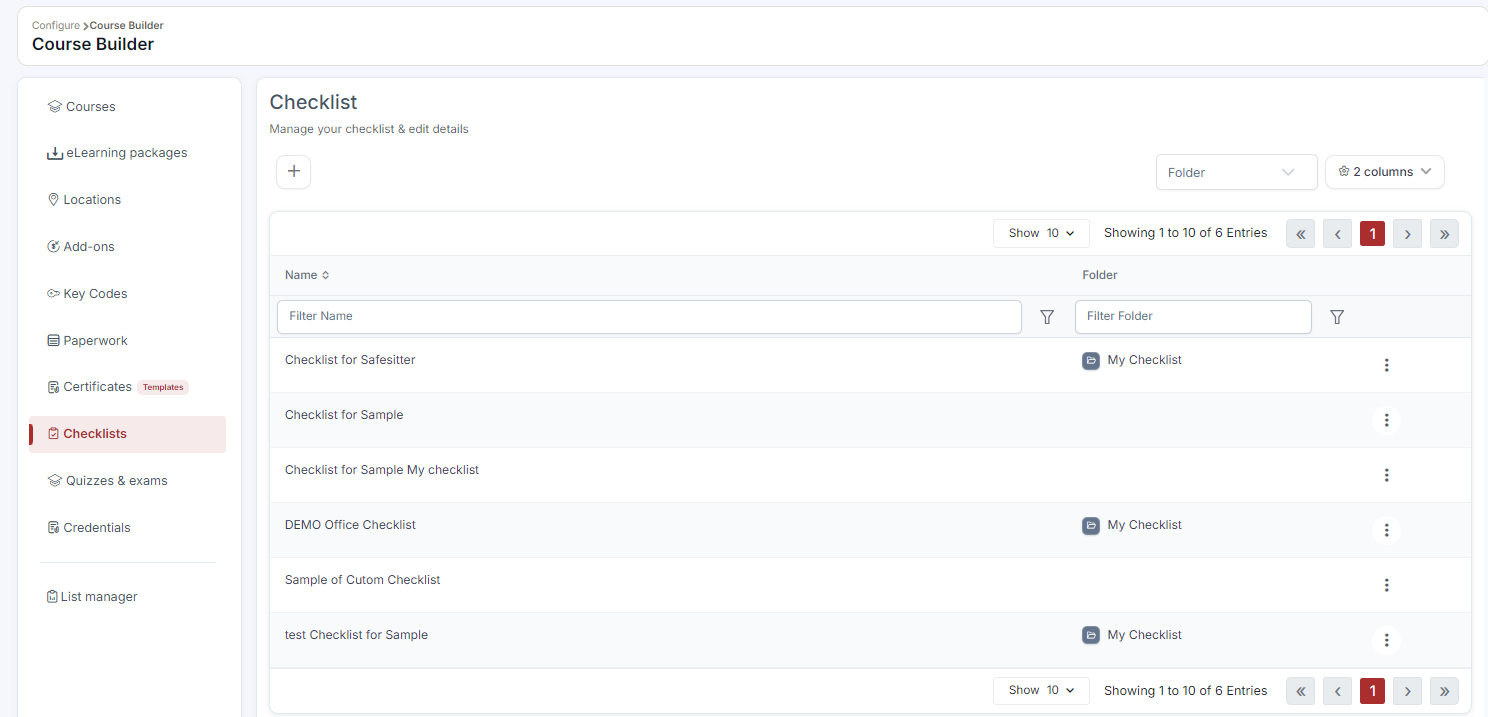
- Go to Course Builder > Checklists.
- Click + Create.
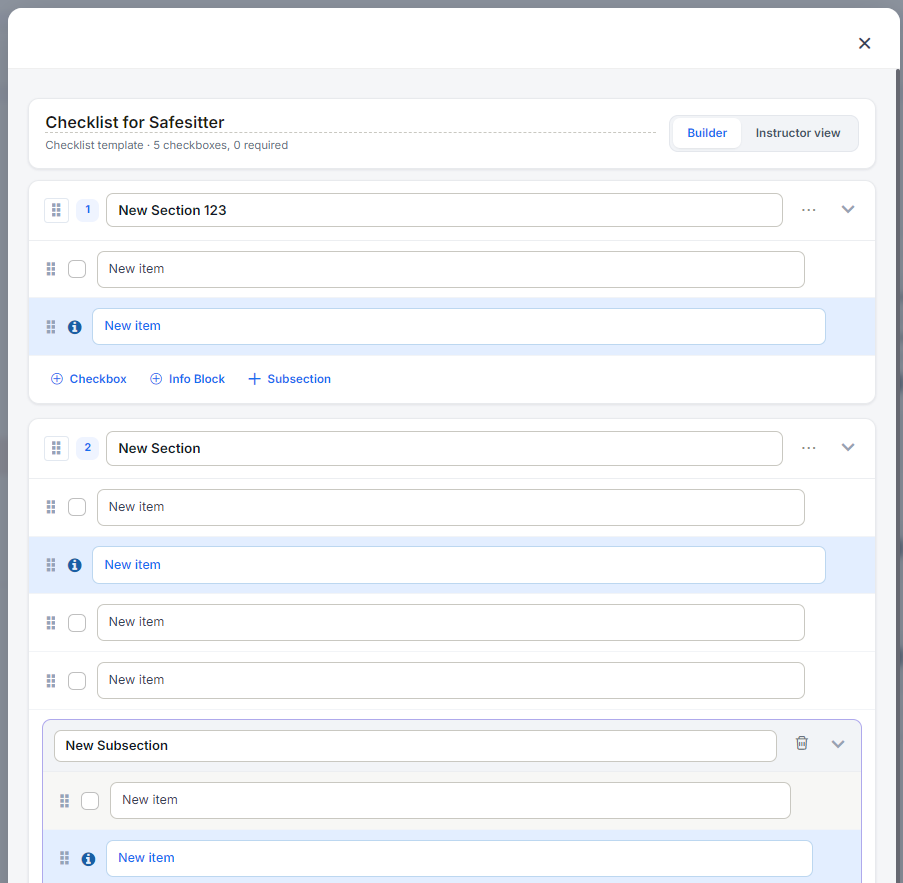
- Enter a Checklist Name (e.g., "BLS Provider Skills Station Setup").
- Add each checklist item — a step or task the instructor must complete.
- Mark any items as required if they cannot be skipped.
- Click Save.
Step 2: Attach a Checklist to a Course
- Go to Course Builder > Courses > ⋮ > Edit.
- Find the Checklists section in the course form.
- Select the checklist(s) from the dropdown.
- Click Save. The checklist appears in the instructor's class view for every class from this course.
Step 3: Update an Existing Checklist
- Go to the Checklists list, click ⋮ > Edit, make changes, and click Save.
- All courses linked to this checklist automatically use the updated version — no reassignment needed.
Step 4: Import a Checklist Template from the Marketplace (Optional)
- Click Marketplace > Checklist Templates.
- Hover over a card and click Use Template to import it, then attach it to any course.
✔ Updates apply automatically: Because checklists are linked to courses rather than copied into them, editing a checklist once updates it everywhere it's attached — there's no need to reassign it to each course individually.
Best Practices
- Mark truly non-negotiable steps as required so instructors can't skip critical safety or compliance items.
- Keep checklist names specific (e.g., "BLS Provider Skills Station Setup") so they're easy to find and attach to the right course.
- Review and update checklists periodically as certification body requirements change — updates apply automatically to every linked course.
- Start from a Marketplace checklist template when one matches your course, then customize it to your procedures.
Frequently Asked Questions
| Question | Answer |
|---|---|
| If I edit a checklist, do I need to reattach it to every course? | No. All courses linked to that checklist automatically use the updated version. |
| Where do completed checklists get saved? | They are saved with the class record for compliance. |
| Can I attach more than one checklist to a course? | Yes. The Checklists dropdown in the course form supports selecting multiple checklists. |
✔ You're all set. Your checklist is created and attached, and will now appear in the instructor's class view for every class scheduled from this course.
Was this article helpful?
Related articles
- How to Setup a Course (Templates)A course in CPR Enroll+ is the blueprint for your training program. It defines everything — the name, description, price, certification body, expiration period, and all the rules that apply to every class scheduled from it. You create a course once, then schedule multiple classes from it over time. Courses
- How to Setup and Add KeycodesKeycodes are digital access codes that give students access to online learning platforms such as AHA HeartCode. When a student enrolls in a course or purchases an add-on that includes a keycode, CPR Enroll+ automatically assigns one from your keycode bank and delivers it in the enrollment confirmatiCourses
- How to Setup Custom Registration QuestionsCustom Registration Questions let you collect additional information from students during enrollment — employer name, employee ID, dietary needs, waiver confirmation, or anything else your training program requires. Questions can be required or optional and can apply to all courses or specific ones.Courses
- Understanding the MarketplaceThe Marketplace is CPR Enroll+'s built-in template library — over 150 pre-built templates from AHA, ARC, HSI, and other certifying bodies. Import courses, paperwork forms, add-ons, keycodes, and checklists in a single click instead of building them from scratch. Before You Begin - Know which certifyCourses