Understanding the Marketplace
The Marketplace is CPR Enroll+'s built-in template library — over 150 pre-built templates from AHA, ARC, HSI, and other certifying bodies. Import courses, paperwork forms, add-ons, keycodes, and checklists in a single click instead of building them from scratch.
Before You Begin
- Know which certifying body (AHA, ARC, HSI, etc.) your courses need to match, so you can filter effectively.
- If you're setting up a new account, plan to browse the Marketplace before manually creating anything.
Step-by-Step Instructions
Step 1: Access the Marketplace
Click Marketplace in the left sidebar.
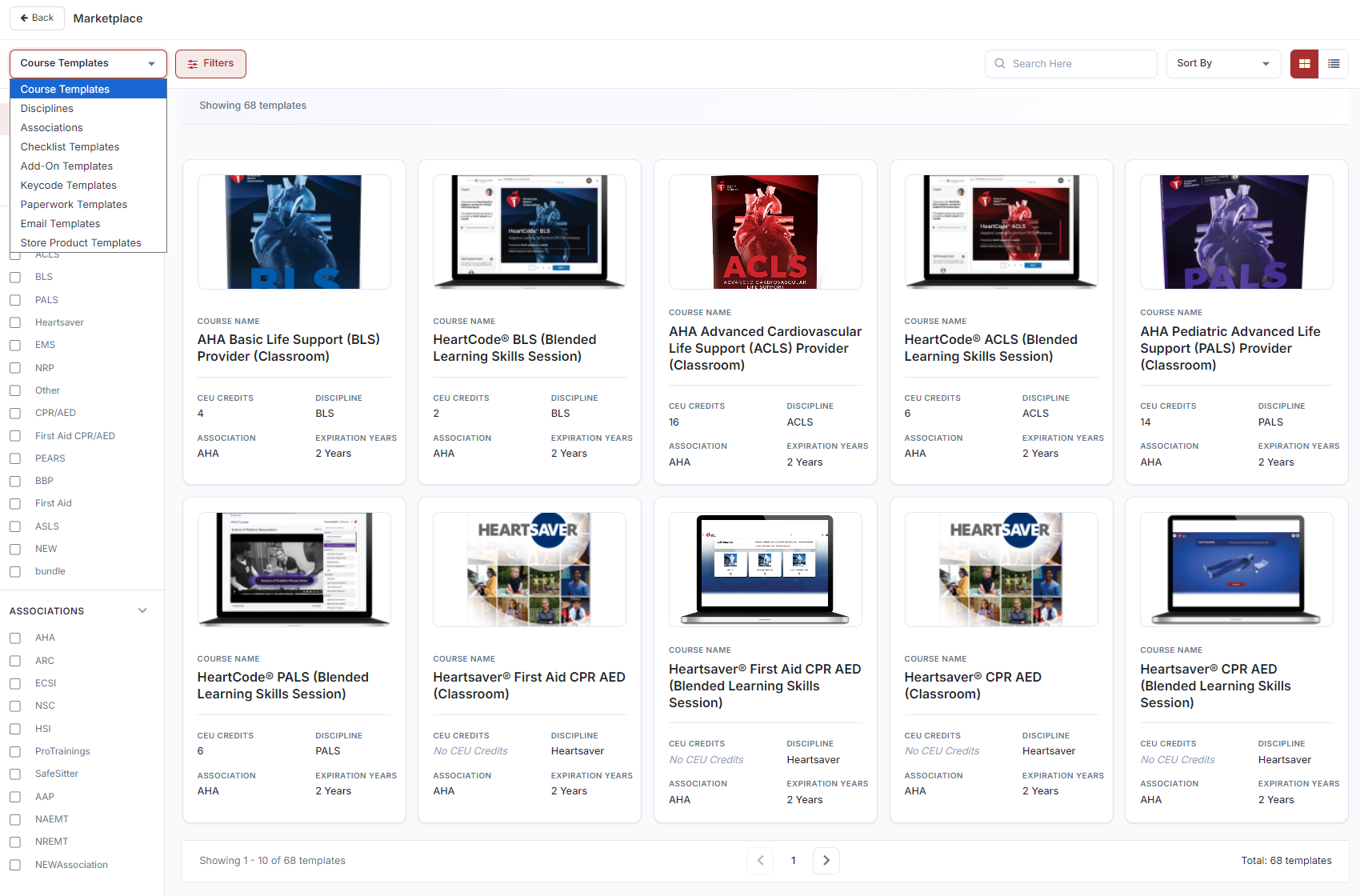
Step 2: Review Template Categories
| Category | Templates | What It Contains |
|---|---|---|
| Course Templates | 68 | Full course configurations from AHA, ARC, HSI, and others |
| Paperwork Templates | 44 | Skills testing and compliance document forms |
| Add-On Templates | 15 | Pre-configured supplementary product setups |
| Keycode Templates | 15 | Keycode bank structures for digital access codes |
| Disciplines | 13 | Official training discipline definitions |
| Associations | 9 | Certification body configurations with official branding |
| Checklist Templates | — | Skills station and class delivery checklists |
Step 3: Browse, Filter, and Import
- Use the category dropdown to switch template types.
- Click Filters to narrow by Discipline or Association. Paperwork Templates support both filters simultaneously.
- Use Search to find by name or keyword.
- Hover over a card — click Preview to review before committing, or Use Template to import immediately.
- A modal opens with the name pre-filled — edit if needed, then click Use Template. The item is instantly added to your account.
✔ Start here on a new account: Import all your course templates from the Marketplace before manually creating anything. Most AHA and ARC courses are covered by the 68 templates — importing takes seconds and pre-fills every field.
Best Practices
- Check the Marketplace first for any new course, paperwork form, add-on, keycode bank, or checklist before building one from scratch.
- Use Preview before importing to confirm a template matches what you need.
- Filter by Discipline and Association together when browsing Paperwork Templates to narrow results quickly.
- Edit the pre-filled name on import if you want your own naming convention rather than the template default.
Frequently Asked Questions
| Question | Answer |
|---|---|
| How many templates does the Marketplace offer in total? | Over 150 pre-built templates across courses, paperwork, add-ons, keycodes, disciplines, associations, and checklists. |
| Can I preview a template before importing it? | Yes. Hover over a card and click Preview to review it before clicking Use Template. |
| Can I filter by both Discipline and Association at once? | Yes, for Paperwork Templates, which support both filters simultaneously. |
✔ You're all set. You now know how to browse, filter, and import from the Marketplace to save time building courses, paperwork, add-ons, keycodes, and checklists.
Was this article helpful?
Related articles
- How to Setup a Course (Templates)A course in CPR Enroll+ is the blueprint for your training program. It defines everything — the name, description, price, certification body, expiration period, and all the rules that apply to every class scheduled from it. You create a course once, then schedule multiple classes from it over time. Courses
- How to Setup and Add KeycodesKeycodes are digital access codes that give students access to online learning platforms such as AHA HeartCode. When a student enrolls in a course or purchases an add-on that includes a keycode, CPR Enroll+ automatically assigns one from your keycode bank and delivers it in the enrollment confirmatiCourses
- How to Setup Custom Registration QuestionsCustom Registration Questions let you collect additional information from students during enrollment — employer name, employee ID, dietary needs, waiver confirmation, or anything else your training program requires. Questions can be required or optional and can apply to all courses or specific ones.Courses
- How to Add or Update an SOP or ChecklistChecklists in CPR Enroll+ are structured step-by-step guides — Standard Operating Procedures — that instructors follow during a class. They ensure consistent delivery across all instructors and sessions, and can cover skills testing protocols, equipment setup, or any other procedural requirement. CoCourses