Whatsapp Error: Business account is restricted from messaging users in this country
You may encounter the following WhatsApp error when attempting to send messages:
“Business account is restricted from messaging users in this country.”
This restriction is related to recent changes in WhatsApp’s cross-country messaging policies and is not caused by an issue with your account setup or platform configuration.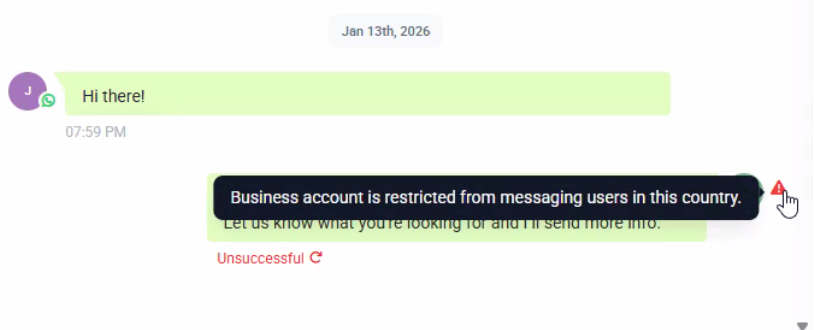
Why This Error Occurs
Effective September 15, WhatsApp implemented a temporary restriction on cross-country messaging involving Brazil (BR) and Indonesia (ID).
Due to this policy update:
Businesses located outside Brazil or Indonesia
Cannot send WhatsApp messages to users located in Brazil or Indonesia.
Businesses located within Brazil or Indonesia
Can only message users within the same country.
Cannot send messages to users in other regions.
This restriction applies to all WhatsApp Business accounts and is enforced directly by WhatsApp (Meta).
What Is Not Affected
Messaging within the same country (Brazil → Brazil, Indonesia → Indonesia) continues to work as expected.
Receiving messages from users is not impacted by this restriction.
Your WhatsApp account status, templates, quality rating, and balance remain unchanged.
Can This Restriction Be Removed?
At this time, this is a WhatsApp-imposed limitation, and there is no workaround or override available from our side. We recommend monitoring official WhatsApp (Meta) announcements for any updates or changes to this policy.
What You Can Do Next
Ensure your messaging use cases align with the country-based restrictions.
If your business operates globally, consider:
Using separate WhatsApp Business accounts per region, where applicable.
Leveraging alternative communication channels for cross-country outreach.
Was this article helpful?
Related articles
- How to Enable WhatsApp in your account?TABLE OF CONTENTS - Method 1: Connect a New WhatsApp Business number - How to Sign Up With the New WhatsApp Business AppPhone Number Verification - FAQs - Q. I received an error message stating that the number is registered to an existing WhatsApp account. What should I do next? - Q. You have alreaSetup
- WhatsApp FAQsTABLE OF CONTENTS - Q. Can I use my existing WhatsApp number for the WhatsApp Business Platform? - Q. Failed to send a message because this user's phone number is part of an experiment - Q. What steps do I need to take to use my existing WhatsApp number? - Q. Can I use my number on both the WhatsAppSetup
- Marketing Opt-out Button to Your Message TemplateTABLE OF CONTENTS - Enhance Customer Experience with a Marketing Opt-Out Button- Benefits of Adding a Marketing Opt-Out Button - Creating a High-Quality Opt-Out Experience Enhance Customer Experience with a Marketing Opt-Out Button Your business can now incorporate a marketing opt-out button in neSetup
- WhatsApp - Workflow IntegrationTABLE OF CONTENTS - Automating WhatsApp Responses with Workflow Automation- Step 1: Create a New Workflow - Step 2: Set Up a Trigger - Step 3: Apply WhatsApp-Specific Filters - Step 4: Define an Automated Action - Step 5: Customize the Automated Response - Step 6: Save & Activate the Workflow - HowSetup