The Marketplace is CPR Enroll+'s built-in template library — over 150 pre-built templates from AHA, ARC, HSI, and other certifying bodies. Import courses, paperwork forms, add-ons, keycodes, and checklists in a single click instead of building them from scratch.
Before You Begin
- Know which certifying body (AHA, ARC, HSI, etc.) your courses need to match, so you can filter effectively.
- If you're setting up a new account, plan to browse the Marketplace before manually creating anything.
Step-by-Step Instructions
Step 1: Access the Marketplace
Click Marketplace in the left sidebar.
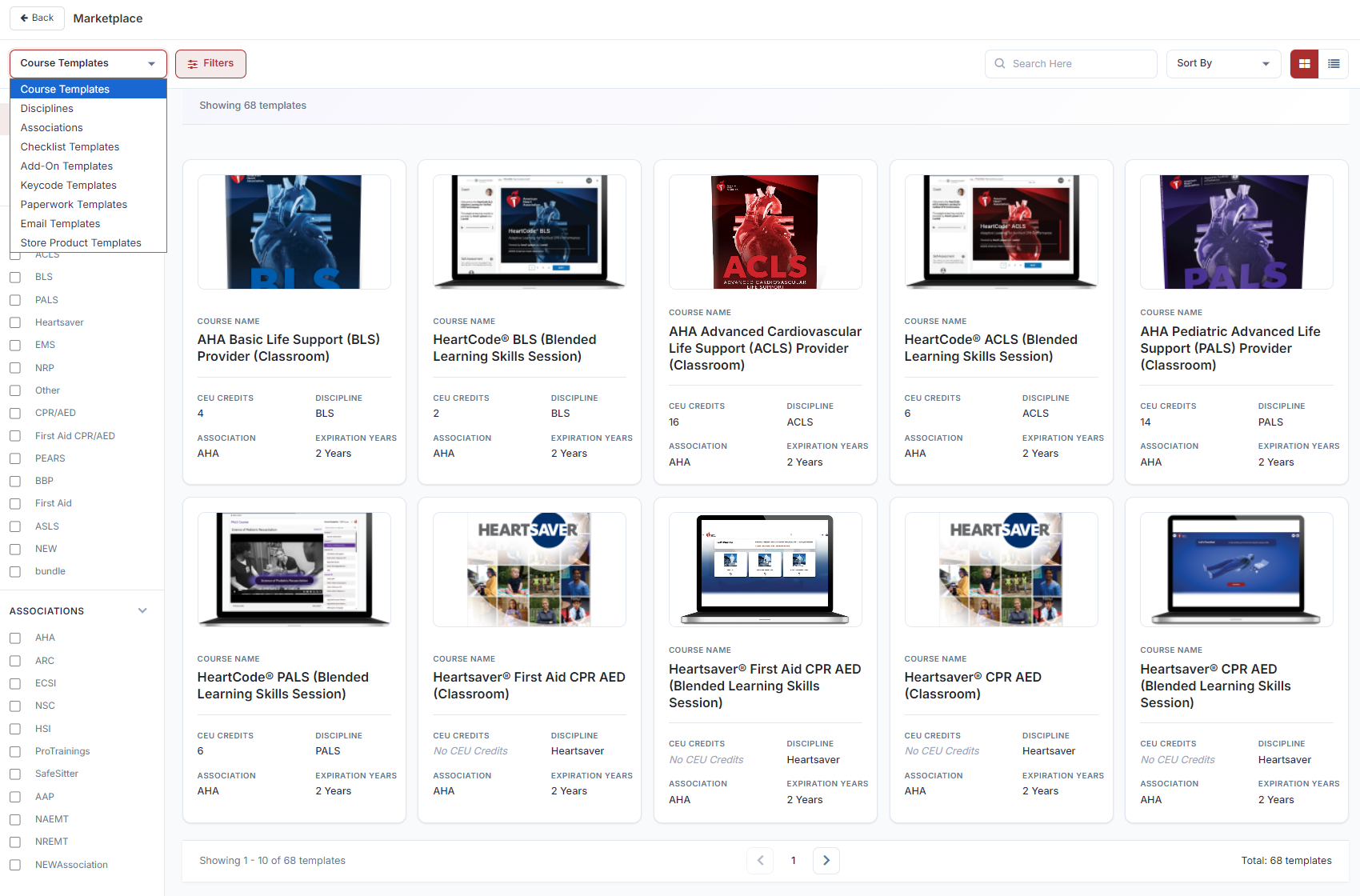
Step 2: Review Template Categories
| Category | Templates | What It Contains |
|---|---|---|
| Course Templates | 68 | Full course configurations from AHA, ARC, HSI, and others |
| Paperwork Templates | 44 | Skills testing and compliance document forms |
| Add-On Templates | 15 | Pre-configured supplementary product setups |
| Keycode Templates | 15 | Keycode bank structures for digital access codes |
| Disciplines | 13 | Official training discipline definitions |
| Associations | 9 | Certification body configurations with official branding |
| Checklist Templates | — | Skills station and class delivery checklists |
Step 3: Browse, Filter, and Import
- Use the category dropdown to switch template types.
- Click Filters to narrow by Discipline or Association. Paperwork Templates support both filters simultaneously.
- Use Search to find by name or keyword.
- Hover over a card — click Preview to review before committing, or Use Template to import immediately.
- A modal opens with the name pre-filled — edit if needed, then click Use Template. The item is instantly added to your account.
✔ Start here on a new account: Import all your course templates from the Marketplace before manually creating anything. Most AHA and ARC courses are covered by the 68 templates — importing takes seconds and pre-fills every field.
Best Practices
- Check the Marketplace first for any new course, paperwork form, add-on, keycode bank, or checklist before building one from scratch.
- Use Preview before importing to confirm a template matches what you need.
- Filter by Discipline and Association together when browsing Paperwork Templates to narrow results quickly.
- Edit the pre-filled name on import if you want your own naming convention rather than the template default.
Frequently Asked Questions
| Question | Answer |
|---|---|
| How many templates does the Marketplace offer in total? | Over 150 pre-built templates across courses, paperwork, add-ons, keycodes, disciplines, associations, and checklists. |
| Can I preview a template before importing it? | Yes. Hover over a card and click Preview to review it before clicking Use Template. |
| Can I filter by both Discipline and Association at once? | Yes, for Paperwork Templates, which support both filters simultaneously. |
✔ You're all set. You now know how to browse, filter, and import from the Marketplace to save time building courses, paperwork, add-ons, keycodes, and checklists.
Was this article helpful?
That’s Great!
Thank you for your feedback
Sorry! We couldn't be helpful
Thank you for your feedback
Feedback sent
We appreciate your effort and will try to fix the article