The Audit Log in CPR Enroll+ keeps a chronological record of every significant action taken in your dashboard — who changed what, and when. It is an invaluable tool for accountability, troubleshooting, and compliance. If a class was accidentally deleted, a student record was modified unexpectedly, or you simply need to know who made a change, the Audit Log is your first stop.
This article walks you through accessing the Audit Log, understanding what it records, reading an entry, and filtering results.
Before You Begin
- Know what you're investigating — a specific record, a specific user, or a specific time period — so you can filter effectively.
- Check whether your certification body requires long-term audit records, so you know if periodic exports are needed.
Step-by-Step Instructions
Step 1: Access the Audit Log
- From the sidebar, go to Settings > Audit Logs.
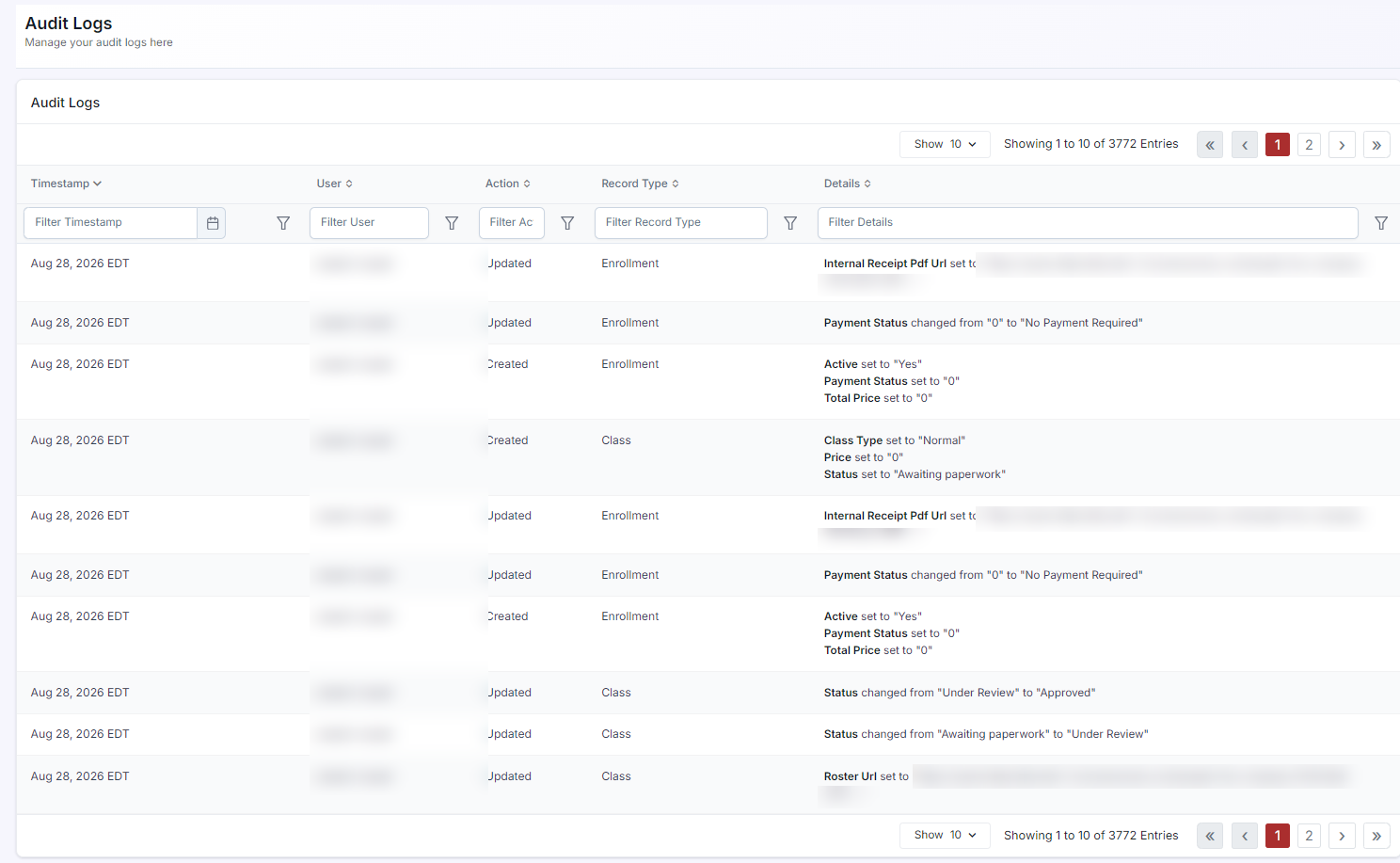
- The log loads with the most recent actions at the top.
Step 2: Understand What the Audit Log Records
- User login and logout events.
- Record creation, editing, and deletion (classes, courses, locations, instructors, enrollments, users).
- Settings changes (permissions, branding, notifications).
- Payment and invoice actions.
- File uploads and document submissions.
Step 3: Read an Audit Log Entry
Each entry in the Audit Log shows:
| Field | What It Shows |
|---|---|
| Timestamp | Exact date and time of the action (in your account timezone). |
| User | The username of the account that performed the action. |
| Action | What was done (e.g., Created, Updated, Deleted). |
| Record Type | The type of record affected (e.g., Class, Course, Enrollment). |
| Details | Specific fields that were changed, often showing the before and after values. |
Step 4: Filter the Audit Log
- Use the Search field to filter by username, action type, or record name.
- Use the Date Range picker (if available) to narrow the log to a specific time period.
- Use the User filter to see only actions by a specific team member.
ℹ Audit log retention: The Audit Log retains records in accordance with CPR Enroll+'s data retention policy. For compliance purposes, consider exporting and archiving the log periodically if your certification body requires long-term audit records.
✔ Troubleshooting tip: If a student's enrollment is missing or a class appears modified, check the Audit Log filtered by the affected record name. The log will show exactly who made the change and when, making it easy to reverse accidental edits.
Best Practices
- Filter by record name first when troubleshooting a specific issue, rather than scrolling through the full log.
- Export and archive the log periodically if your certification body requires long-term audit records.
- Use the User filter to review a specific team member's activity when investigating an accountability question.
- Check the Audit Log as your first troubleshooting step whenever a record looks unexpectedly changed or missing.
Frequently Asked Questions
| Question | Answer |
|---|---|
| What order are entries shown in? | The log loads with the most recent actions at the top. |
| Can I see exactly what changed in a record, not just that it was updated? | Yes. The Details column often shows the specific fields that were changed, including before and after values. |
| How long are audit records kept? | Records are retained in accordance with CPR Enroll+'s data retention policy. Export and archive the log periodically if your certification body requires longer-term records. |
✔ You're all set. You now know how to access, read, and filter the Audit Log to track changes and troubleshoot issues across your account.
Was this article helpful?
That’s Great!
Thank you for your feedback
Sorry! We couldn't be helpful
Thank you for your feedback
Feedback sent
We appreciate your effort and will try to fix the article